The best AI trading tools in India for options traders turn a plain-English rule into a strategy you can backtest. Three platforms cover this workflow:
AlgoTest suits you if you want to build an indicator strategy with Signals AI, compare versions of a time-based strategy with Agent 920, or pull historical market data into your own AI assistant with AlgoTest MCP.
Tradetron suits you if you want to build and backtest from an AI chat you already use, such as ChatGPT or Claude.
uTrade Algos suits you if you want to replay a trading day and see where a strategy gained or lost money.
Have a trading rule in mind? Sign up free on AlgoTest and turn it into a strategy you can see on a chart and backtest on option prices.
Which AI Trading Tool Fits Your Workflow?
We compared the features each platform documents for Indian markets. The Nifty example below gives you one set of rules to try in all three. We haven’t run it in paid accounts or ranked the tools by returns.
One Nifty Options Strategy to Try in All Three Tools
Ask an AI tool to “buy Nifty when the 20 EMA crosses above the 50 EMA” and you’ve given it only half a strategy. The crossover tells it when to enter, but not what to buy. A Nifty futures contract and a weekly call can give very different results from the same signal.
An EMA is an exponential moving average. A 20-period EMA gives more weight to recent prices, so it reacts faster than a 50-period EMA.
Prompt box: copy this prompt
Use five-minute Nifty 50 spot candles. Calculate the 20-period and 50-period EMAs using closing prices. On the first completed candle of the day where the 20 EMA crosses above the 50 EMA, buy one lot of the nearest weekly at-the-money Nifty call. Choose the strike at entry and hold that same contract. Exit when the 20 EMA crosses back below the 50 EMA or at 3:15 pm IST, whichever comes first. Take at most one trade per day. Skip new entries at or after 3:15 pm.
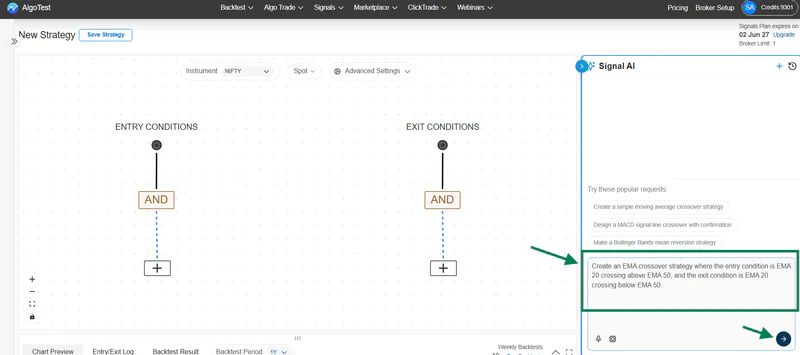
If the tool builds the signal and the order in separate steps, enter the EMA rules first. Then choose buy, call, one lot, nearest weekly expiry and ATM at entry in the trade settings.
Use the same dates and fill assumptions in every tool. Note whether each engine fills at the signal candle’s close or at the next available price.
1. AlgoTest: Best for Checking a Nifty Signal Against the Option Trade

For the crossover above, open Signals AI and choose the five-minute Nifty spot chart. On the Canvas, check the entry condition.
“Crosses above” fires when the faster EMA moves from at or below the slower EMA to above it. “Is above” can be true for several candles in a row. If the 20 EMA is already above the 50 EMA when the market opens, that wording can change your first trade of the day.
In Chart Preview, pick an entry marker and note its time. In Backtest Results, attach the weekly call, set the intraday exit and run the test.
Download the trade log and find the row for that signal. Check that it shows the call you meant to buy, and that the exit closes the same strike and expiry.
Build the same Nifty EMA crossover in AlgoTest Signals AI and check every entry on the chart before you backtest it.
When Would You Use Agent 920 or AlgoTest MCP?
Use Agent 920 to compare entry times. Suppose you already have a Nifty short straddle that sells a call and a put at 9:20 am. Open the saved strategy on the Backtest page and ask: “Compare 9:20 am and 9:30 am entries over the same dates. Keep the strike selection and exit rules the same. Show net P&L and maximum drawdown for each.”
Give the agent your brokerage and slippage assumptions and ask it to include taxes. You can then see whether a later entry changed the profit, the size of the losses, or both.
Agent 920 also warns you when a setting only looks good on one stretch of history, but it can make mistakes, so check its numbers before you trade on them. For Nifty strategies, it requires a Limited or Unlimited Backtest plan.
Use AlgoTest MCP to investigate a specific trade. MCP (Model Context Protocol) connects an assistant such as Claude Desktop to AlgoTest’s historical candles and option Greeks. Pick a trade from the last three months and give the assistant the date, expiry and exact strike from your log.
Then ask: “Show the five-minute candles for this Nifty call from entry to exit, alongside Nifty spot.” Keeping the strike fixed lets you follow the call you held, even if a different strike became at the money later. AlgoTest MCP is read-only, covers the most recent three months of data and never places orders.
How AI tokens work. Signals AI and Agent 920 share one balance of AI tokens, and one token equals ₹1. A 1-Month Signal Plan credits 300 tokens, the 6-Month plan credits 2,000, and unused tokens carry forward.
The cost of each reply depends mostly on the AI model you choose. MCP runs through your own assistant and uses no AlgoTest tokens.
2. Tradetron: Best for Building From ChatGPT or Claude
Tradetron’s connector lets you describe the strategy in your AI chat and open the resulting rules in your Tradetron account. You can then request a backtest from the chat and follow the report link to inspect the trades. The connector never places a live order, so going live stays a separate step in your account.
For the Nifty example, open the generated strategy before you run it. Check which instrument supplies the EMA values and which one appears in the buy leg.
Then check that 3:15 pm actually closes an open trade. A rule that only stops new entries after 3:15 can leave the morning’s call open.
3. uTrade Algos: Best for Replaying an Individual Trading Day
uTrade Intelligence builds indicator-based equity and options strategies from prompts. It runs a backtest as you build, and its Day Replay lets you open one session and follow entries, exits and P&L minute by minute.
For this setup, pick a day when the call stayed open into the afternoon and replay the minutes around 3:15. Did the time exit close the position? Did another entry appear later? A total P&L figure can look plausible even when one of those rules is wrong.
Check how much backtest history your plan includes, because the fresh-dates test below needs several months of data.
Why AlgoTest Suits Nifty Options Traders
You get three AI tools on one platform: Signals AI builds indicator strategies, Agent 920 tests changes to time-based strategies, and AlgoTest MCP brings market data into your own AI assistant.
You build, check and backtest signals inside AlgoTest, with no TradingView plan, Pine Script or webhooks needed.
Agent 920 applies slippage, brokerage and taxes, and recalculates every metric on the net result.
You can forward test a strategy and then run it live through your broker without leaving the platform.
How to Tell Whether the Backtest Used the Right Prices

Take one row from the trade log and work it out by hand. Suppose Nifty rose 30 points while the call you bought fell from ₹120 to ₹115. The trade lost ₹5 per unit before costs, which you multiply by the contract’s lot size on the trade date.
If the report shows a 30-point gain instead, it may have measured the move in Nifty rather than the change in the call premium. These numbers are only an illustration.
Once that row checks out, look at three things across the full test:
Check the trade count. If the report shows two entries on the same day, the one-entry limit isn’t working, and if two tools show different counts, compare the first date they disagree before you compare returns.
Match trading costs. Use the same brokerage, charges and slippage in each run, and label any report that leaves costs out as gross, because a small gain per trade can disappear after costs.
Test on fresh dates. Build the rule on January to June 2026, leave it unchanged, then test July to September 2026 and compare the number of trades, the maximum drawdown and net P&L.
If one trade still looks odd, open that date in the AlgoTest Option Simulator. Select the same expiry and strike, then step through the session to see how the premium moved between entry and exit.
Pick the Tool, Then Check the Trade Log
An AI tool only saves time if its backtest matches your rules. Write down the signal, the contract and the exit, run the same Nifty rule with the same dates and costs, and check one trade by hand before you trust the totals. Then test it on fresh dates before you go live.
AlgoTest lets you build signals with Signals AI, test changes to time-based strategies with Agent 920 and check individual trades with AlgoTest MCP, before you decide to deploy.
Join us as we simplify algo trading in India.
Related Reading
FAQs
Can I backtest a Nifty options strategy with AI without coding?
Yes. AlgoTest Signals AI, Tradetron and uTrade Algos document ways to turn plain-language rules into a strategy and test it on historical data. For an options trade, specify the signal chart, call or put, expiry, strike rule, quantity and exit.
What is Agent 920 on AlgoTest?
Agent 920 is AlgoTest’s AI analyst for time-based strategies you already have. It runs backtests from your requests, compares the runs side by side, filters results by weekday or DTE, and applies slippage, brokerage and taxes. It needs a Limited or Unlimited Backtest plan.
What is AlgoTest MCP?
AlgoTest MCP connects AI assistants such as Claude Desktop to AlgoTest’s historical candles, option Greeks and instrument lists. It is read-only, covers the last three months of data and doesn’t use AlgoTest AI tokens.
How much does AI cost on AlgoTest?
Signals AI and Agent 920 spend AI tokens from one shared balance, and 1 token equals ₹1. Signal Plans and Limited or Unlimited Backtest plans credit tokens when you buy them, and you can buy more in multiples of ₹100.
Is a free AI chatbot enough to backtest a strategy?
A chatbot can help you write the rules. To calculate historical options P&L, it also needs the prices of the contracts your rules would have traded and a way to simulate entries and exits. Ask for a trade log with dates, contracts and fill prices before you rely on a result.
Do I need a paid TradingView plan to use AlgoTest Signals AI?
No. Signals AI builds the indicator rules, shows the signals on the chart and runs the backtest inside AlgoTest. You need an active AlgoTest Signal Plan for this workflow.
Editorial sources: AlgoTest AI features checked on 15 November 2026 using the AI on AlgoTest overview and its Signals AI, Agent 920, MCP and AI Tokens guides. Competitor features checked on 14 November 2026. Tradetron AI connector · uTrade Algos backtesting and Day Replay