AlgoTest and StockMojo both let you replay a past trading day and trade options on it with no real money involved. The difference shows up in what happens around the replay.
Quick answer:
StockMojo is quicker to start. Basic use needs no sign-up, and it has lots of free market data around the simulator.
AlgoTest goes further after the replay. You can replay your own past trades, cover MCX, and turn what you practised into a backtest or a live strategy.
If you only want a quick look at how premiums moved on a past day, either works. If practice is step one of a plan, AlgoTest fits better.
This comparison uses each product’s published pages and documentation as of 10 November 2026.
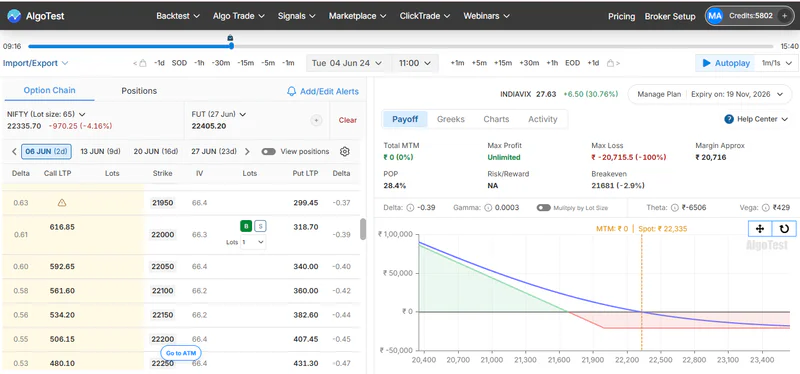
Run this comparison yourself in 10 minutes. Pick a recent Nifty expiry day. On each simulator, sell the ATM call and put at 9:20 AM, move forward to 11:00, and convert the position to an iron fly if one side comes under pressure. Start with the AlgoTest Option Simulator.
What a Replay Simulator Does, and Why the Choice Matters
A replay simulator is the closest thing to trading a real session without the real risk. You see the option chain as it was, the premiums as they traded, and how your position would have behaved minute by minute.
Both tools offer that core. But a practice tool you outgrow in a month costs you time, so it’s worth knowing which one fits where you’re headed.
The Trade We Used
We kept it simple, so the comparison stays about the tools:
Underlying: Nifty, on a weekly expiry day (Nifty weeklies now expire on Tuesdays).
Entry: sell the ATM call and ATM put at 9:20 AM.
Risk: a stop-loss on each leg.
Adjustment: if the market trends hard one way, buy wings on both sides to turn the short straddle into an iron fly.
Expiry days are where replay practice pays off most, because premiums move fastest and adjustments matter most.
AlgoTest vs StockMojo: Feature-by-Feature, Step by Step
What stands out: for the replay itself, the two tools are closer than you might expect. Both handle multi-leg positions, Greeks and the straddle-to-iron-fly adjustment. The gaps are at the edges. StockMojo is lighter to start and can square off on a stop automatically. AlgoTest replays your own trades, covers MCX, and doesn’t end when the replay does.
Related: How to Backtest a Strategy on an Option Simulator
Pricing: What You Get for Free
StockMojo’s plan prices didn’t load on its public pricing page when we checked, so confirm them on its site before you buy.
The real cost question is how far back you want to practise. If you want to replay older events, like an RBI policy day or a budget session, check how much history each tool gives you before you pay.
Practised an adjustment that worked? Find out if it holds across a year of expiries. Sign up to get 100 Backtests free/month
StockMojo: Pros and Cons
Pros
You can open the simulator and start replaying without creating an account.
Fine step sizes, from one minute to one day, make it easy to slow down fast moves.
Stops and targets can square off a leg automatically, which keeps practice honest.
The simulator sits next to many free analytics tools, such as OI, PCR, max pain and gamma exposure.
Cons
Simulated results leave out brokerage, taxes and slippage, so profits look better than they would live.
How much history the free tier includes isn’t stated, and extended history is paid.
Saving strategies requires a paid plan, and paid plans aren’t refundable.
Its pages don’t list rule-based backtesting, forward testing or execution, so practice stays practice.
AlgoTest: Pros and Cons
Pros
You can replay your own live or paper trades, not just new ones, which is the fastest way to spot habits that cost you money.
Positions built in the Strategy Builder go straight into the simulator, so you don’t rebuild trades.
It covers MCX commodity options as well as index and stock options.
The idea you practise can become a backtest, then a forward test, then a live strategy through your broker.
Cons
You need a free account before you can start, so there’s no anonymous quick look.
StockMojo offers a wider spread of free market dashboards around its simulator.
With more tools on the platform, there’s more to learn if all you want is one quick replay.
Related: Opstra Simulator vs AlgoTest Simulator
Which One Fits You?
If you’re new to options and want to see how premiums behave, either works. StockMojo is quicker for a first look. AlgoTest is better if you want to keep and revisit what you build.
If you sell options on expiry days, both handle straddle adjustments. Choose AlgoTest if you’ll want to test that adjustment rule across many expiries afterwards.
If you want to fix your own mistakes, choose AlgoTest. Replaying your actual trades shows what you did, not what you would have done.
If you trade commodities, choose AlgoTest, which replays MCX sessions.
If you live in OI, PCR and flow data, StockMojo’s free dashboards next to the simulator will suit you.
If you plan to automate one day, start on AlgoTest, so your practice and your strategy live in one place.
Our Recommendation
Use AlgoTest when practice is the first step toward a strategy you’ll actually run, because the replay, your own trade history, testing and execution all sit together.
For a wider view, our best options simulators in India roundup compares more tools, and our StockMock vs AlgoTest Option Simulator comparison covers the other big name.
Get More From Every Replay
Whichever simulator you pick, how you practise matters more than the tool. A simple routine:
Pick one setup and stick to it. Use the same entry time, the same strikes and the same stop for every session.
Replay at least ten different days. Mix quiet sessions, trending ones, expiry days and at least one big news day.
Write down every decision before you move time forward. That includes your entry, your adjustment and your exit. Replays are easy to game if you peek ahead.
Count the costs. Take brokerage, taxes and slippage off each result, so your practice P&L looks like a real one.
Look for the pattern, not the best day. If the setup only works on two days out of ten, that’s your answer.
When those notes point to a rule you trust, AlgoTest lets you check it across hundreds of past sessions in one run instead of ten by hand.
Join us as we simplify options trading in India.
Related Reading
FAQs
Is the StockMojo option simulator free?
Partly. StockMojo’s core simulator is free, and basic use needs no sign-up. Extended history and saved strategies need a paid plan.
Do I need to sign up to use AlgoTest’s option simulator?
Yes, you need a free AlgoTest account. You don’t need a broker account to start replaying sessions.
Does StockMojo include brokerage and slippage in simulated results?
No. StockMojo’s simulator page says brokerage, STT, exchange charges and slippage are excluded, so you need to subtract them yourself.
Can I replay my own past trades?
On AlgoTest, yes. You can import your live or paper trades into the simulator and replay them. StockMojo’s pages don’t list this feature.
Which simulator supports MCX commodity options?
AlgoTest replays MCX sessions, along with index and stock options. StockMojo’s simulator page lists indices and NSE F&O stocks.
Is AlgoTest or StockMojo better for beginners?
Both work for a first replay. StockMojo is faster to try without an account, while AlgoTest suits beginners who want to save their work and build on it.