Where you look up an option depends on the question. If you want the open interest at a Nifty strike today, start with a live option chain. If you want to know what that option traded at yesterday at 11:00 am, open a historical replay.
The best option chain analysis tools in India are NSE, AlgoTest, Sensibull, Opstra and Quantsapp, and each answers a different question. NSE is a useful first stop for official Nifty data. AlgoTest gives you free live Sensex and Nifty option chains, and lets you follow a strike through a past session. Sensibull is useful for comparing open interest across strikes, Opstra for testing a position in five-minute steps, and Quantsapp for studying historical quotes and Greeks.
Sign up free on AlgoTest to read live Sensex and Nifty chains and replay any past session minute by minute.
Which Option Chain Tool Should You Use?
For a Live Chain, Compare One Row Before Comparing the Whole Screen
Open the Nifty option chain and the same expiry on NSE. Choose one strike and one side, such as the call, and read the last traded price (LTP), volume and OI across that row.
Volume counts contracts traded during the session. OI counts contracts still open. A strike can trade heavily even when its OI barely changes.
If two screens show different numbers, check the quote time first, then the units. NSE displays volume and OI in contracts, while a platform showing the underlying quantity can display a much larger number for the same position.
Also check what each screen means by “change in OI”. A change since the previous close and a change since 10:00 am cover different periods.
For a detailed walkthrough, read Sensex Option Chain Explained: How to Read, Analyse and Trade Using Live Data
Checking a Sensex Strike
Sensex options trade on BSE, so NSE’s chain won’t show them. Open the live Sensex option chain on AlgoTest and pick the expiry yourself, because a “nearest expiry” shortcut can quietly switch contracts when you move to another trading date.
Then read one row the same way you would for Nifty: LTP, volume and OI for a single strike and side. Sensex contracts have their own expiry day and lot size, so check both before you compare position sizes with a Nifty trade.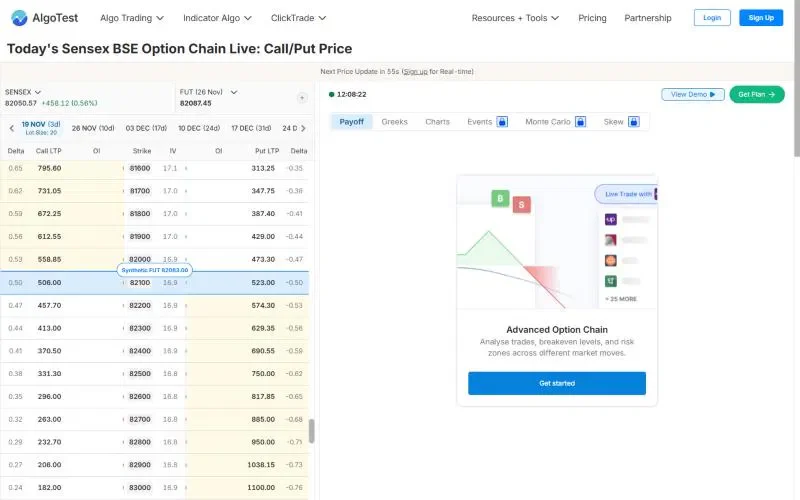
Compare call and put OI, IV and Greeks for every Sensex strike on the AlgoTest Sensex option chain.
A Real Nifty Put With Two Different End-of-Day Prices
Take the Nifty 22,600 put expiring 6 June 2024. On 4 June, its daily closing price was ₹878.30, while its last traded price was ₹810.15.
That’s a ₹68.15 difference per unit for the same strike, expiry and trading day. Both figures appear in the historical contract record under different columns, and you can look up the row in NSE’s historical contract-wise price and volume report.
How to Compare the Same Option in Two Replay Tools
In the AlgoTest Option Simulator, set the trading date to 4 June 2024 and the time to 11:00 am IST. Set the underlying to Nifty, the expiry to 6 June 2024, the strike to 22,600 and the option type to PE (put).
Record the premium and the field label, then enter the same contract and timestamp in a second tool. If it shows a five-minute candle, check whether 11:00 labels the start or the end of that candle before you compare its close with a snapshot.
Advance to 11:05 am with the strike fixed. If a tool automatically follows the at-the-money strike as Nifty moves, it may switch contracts, so keeping 22,600 selected lets you follow the option you started with.
For this exercise, AlgoTest lets you step through the minutes in between, while Opstra’s documented five-minute interval fits the two endpoints. If both tools show the same last trade but you want to know what it might have cost to buy the put, use Quantsapp’s historical quotes to check the bid-ask spread.
Related: Opstra Simulator vs AlgoTest Simulator
Why AlgoTest Works for Sensex and Nifty Options
You get free live chains for both Sensex and Nifty, so BSE and NSE contracts sit in one place.
You can replay an expired option minute by minute in the Option Simulator, keeping the same strike fixed as the index moves.
You can add another leg to follow a spread, then take the idea into the Strategy Builder.
Match the Tool to the Question
A live chain tells you what is happening at a strike now, a daily report tells you how the day closed, and a replay tells you what the premium was at a given minute. Pick the record that matches your question, fix the expiry and strike, and compare one row before you compare whole screens.
AlgoTest gives you live Sensex and Nifty chains and a minute-by-minute replay of past sessions, so you can check a contract before you trade it.
Join us as we simplify options trading in India.
Related Reading
FAQs
Which free option chain analysis tool should I use for Nifty?
NSE’s public chain is a good starting point for checking a strike’s OI, volume, IV and premium. AlgoTest, Sensibull and Quantsapp also offer a live chain for free. Check historical coverage separately if you need an expired contract at a particular minute.
Can I download a historical option chain in Excel?
NSE offers CSV downloads that open in Excel. Its contract-wise report covers one contract over a date range, and its daily F&O bhavcopy contains rows for many contracts on one day.
For the chain at 11:00 am, you need intraday data with timestamps. Check whether the provider offers an export if a spreadsheet is essential.
Can I use the NSE option chain for Sensex options?
No. Sensex options trade on BSE, so they don’t appear on NSE’s chain. Use BSE’s equity derivatives chain for the exchange record, or the free Sensex option chain on AlgoTest to compare call and put OI, IV and Greeks across strikes and expiries.
Can I replay an expired Sensex option?
Yes. In the AlgoTest Option Simulator, set the underlying to Sensex, pick the trading date, expiry, strike and time, then step forward minute by minute to see how the premium moved.