Signals AI is the best AI-based TradingView alternative for Indian traders in 2026. It lets you describe your strategy in plain English and run backtests in minutes, depending on strategy complexity. and execute trades directly through your broker. No Pine Script, no relay bots, no stitching three tools together.
If you have spent more time debugging your setup than actually trading, this is worth a read.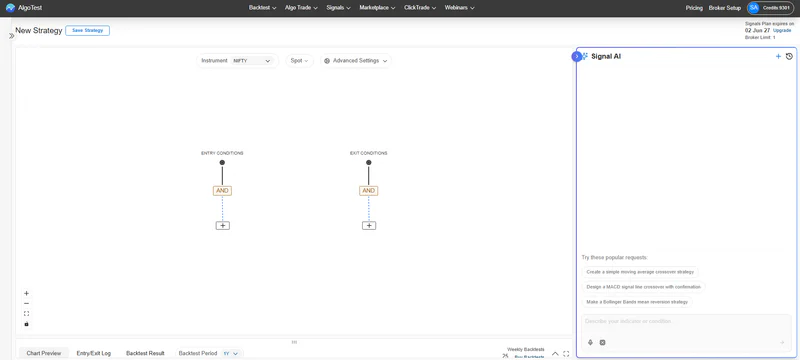
Why Traders Are Looking for a TradingView Alternative
TradingView is excellent for charts. There's no argument there.
But if you're an Indian trader who wants to actually automate your strategy and trade live, TradingView was never really built for that. You end up with something like this:
Write your strategy in Pine Script (a coding language most traders don't know)
Set up webhook alerts manually
Route them through a relay bot like Algomojo, AutoTrader, or similar
Connect that to your broker
Pray the whole chain stays online when the market opens at 9:15 AM
It's not really an automated system. It's four tools held together with hope.
And when something breaks, which it does, then you're debugging across three dashboards during the most stressful 15 minutes of your trading day.
Learn how to create trading signals with AI
What is an AI-based trading platform?
An AI-based trading platform lets traders build strategy logic using plain English or a visual interface, without coding. The AI converts your idea (like "buy when RSI crosses 30 and price is above 200 EMA") into structured signal conditions that can be backtested and executed automatically.
The key difference from traditional platforms is accessibility. You do not need to know Pine Script, Python, or any technical language. The AI handles the translation from idea to logic.
This matters especially in India, where most retail traders come from non-technical backgrounds but still want to test and automate their setups.
Related read: How AI is Changing Algo Trading in India
What is Signals AI?

Signals AI is built specifically for Indian traders who want to go from strategy idea to live execution, without piecing together multiple tools.
In one line: Build your signal, backtest it, paper-trade it (forward test), and run it live. All in one place.
Here is what that looks like in practice.
1. The AI Signal Agent - Plain English, Real Logic
This is the part most traders find surprising when they first use it.
You type something like:
"Buy when RSI crosses above 30 and price is above 200 EMA. Exit when RSI hits 70 or price drops 2% from entry."
The AI breaks it down into:
Entry:
RSI(14) crossover 30 AND Close > EMA(200) → BUYExit:
RSI > 70 OR −2% from entry → EXIT
That's a complete signal, ready to backtest. No Pine Script. No formulas. Just describe what you want to do, and the AI builds it.
It supports 15+ technical indicators including RSI, EMA, SMA, MACD, Bollinger Bands, SuperTrend, and Williams %R. You can combine them with AND/OR logic, set separate entry and exit conditions, and refine everything on a visual canvas.
Signals can also adapt to rolling ATM strikes and expiries automatically, removing manual chart maintenance.
Who this is for: Any trader who has a clear idea of what they want to trade but has no interest in learning to code.
2. The Visual Canvas — When You Want More Control
Not every trader wants to type their strategy out. Some prefer to see it visually.
The Canvas lets you drag and drop indicator nodes, connect them with logic conditions, and wire up your complete strategy without writing a single line of code. Think of it as a flowchart builder for trading strategies.
You can:
Combine multiple indicators with AND/OR conditions
Set independent entry and exit rules
Add filters to avoid bad market conditions
Tweak individual parameters (like RSI period or EMA length) directly on the canvas
It's especially useful when your strategy involves more than two conditions and you want to see the full logic laid out clearly.
3. Build Trading Signals on More Than Just Spot Charts
Signals AI supports signal generation on:
spot charts
futures charts
option charts
synthetic futures
combined premium charts
4. multilingual + voice AI input
Users can:
type prompts
voice prompts
multiple languages
You can type or speak your strategy idea in plain English (and supported local languages).
Step 1: Backtesting — Validate Before You Risk a Rupee
Most traders skip backtesting because it is too painful on traditional platforms. On TradingView, you need Pine Script, manual data handling, and often a paid plan just for enough historical bars.
On AlgoTest Signals AI, you connect your indicator-based signal to a strategy, select your backtest period, and hit run. Results come back in under 30 seconds. Historical data is included. No separate subscription needed.
What the backtest results cover:
Year-wise Returns: See how your strategy performed in each individual year. This helps you spot whether your edge holds up across different market conditions or whether it only worked during a specific trend.
Cumulative P&L vs. Underlying Value This chart compares your strategy's total profit over time against the underlying asset's price movement.
Max Drawdown: Say your strategy grows your capital to ₹1 lakh, then drops to ₹83,000 before recovering. That ₹17,000 drop is your max drawdown. It tells you how much you would have lost at the worst point during the backtest. You can also run a Monte Carlo Analysis to see how the strategy holds up across different market scenarios.
Strategy Stats at a Glance
Smart Trade Logs Every trade is logged in a day-wise format. You can sort by PnL or date, and download the full report as a CSV file. No spreadsheet setup needed.
Once the numbers look solid, fine-tune the strategy if needed. When you are satisfied, save it and move to paper trading.
Related Read:Backtesting in Signals AI
Step 2: Paper Trading (aka forward testing) Test in Live Markets, Without Real Money

Paper trading (also called forward testing) bridges the gap between historical results and live performance. It lets you run your strategy in real market conditions using live price data, without placing actual orders.
Learn more about paper trading
How to start paper trading on Signals AI:
Go to Signal Dashboard → Indicator → Saved Signals, find your strategy, and click Forward Test. The strategy deploys immediately and starts listening to live market signals.
You will see it appear under Indicator → Forward Test with the status showing as 1 Deployed.
Controls while paper trading:
Pause Listening: Temporarily stop the strategy from monitoring signals
Start Listening: Resume monitoring when you are ready
Logs: View a full activity log of every signal event
Debug: Copy strategy details for troubleshooting if something looks off
Delete: Stop and remove the paper trade instance when done
Once you have watched the strategy run through a few real sessions and the results match your expectations, you are ready for the final step.
Related read:Best Paper Trading Websites in India.
Step 3: Live AlgoTrade — Real Execution, Full Automation
From Saved Signals, configure your Execution Settings, click AlgoTrade, connect your broker, and hit Deploy. The strategy starts running under Indicator → AlgoTrade. That is it.
Execution Settings (one-time setup):
You set these once before going live. No daily configuration needed.
Entry and exit order types (Limit or Market)
Trade monitoring method (LTP or Candle Close)
Execution timing, buffers, and delays
Auto Square-Off for end-of-day risk control
Execution days (Weekdays or DTE-based)
The same controls from paper trading carry over: Pause Listening, Start Listening, Logs, Debug, and Delete. All major Indian brokers are supported. No relay bot required.
Read the Product Documentation for a detailed walkthrough of each stage.
TradingView vs Signals AI: Quick Comparison
Why Signals AI for Indicator-Based Strategies?
Signals AI is a good fit if you:
Have a clear strategy idea but do not want to code it
Are already using TradingView with a relay bot and want to simplify
Want to backtest ideas properly before putting capital at risk
Need paper trading to validate performance in live conditions before going live
Trade Indian indices or equities and need reliable automated execution
Are new to algo trading and want a structured, step-by-step workflow
It is probably not the right move if you:
Only need charts and technical analysis. TradingView is still excellent for that
Have a complex strategy that depends on very specific indicators, not yet on AlgoTest
Prefer writing and maintaining full code-based strategies
Check out the best Paper trading apps for Indicator algo strategies
Final Thoughts
The TradingView plus webhook plus relay bot setup has been the standard for Indian algo traders for years. It works, until it does not. And when it breaks, it always seems to break at the worst time.
AlgoTest Signals AI replaces that chain with a single, end-to-end workflow: It's a reliable way to build, validate, and run a strategy without stitching tools together.
Join us now and get priority support.