If you use a Chartink screener for intraday trading, you probably already have a set of conditions you look for before taking a trade.
It could be:
RSI crossing a certain level
A moving average crossover
A volume spike
A price breakout
A combination of multiple indicators
You can create these conditions in a Chartink screener, scan stocks, and get alerts when your conditions are met.
But what happens after you find the setup?
You may want to know if the setup actually worked in the past. You may want to test different entry and exit rules. And once you are confident about the strategy, you may want to execute it without manually watching the market.
This is where AlgoTest can offer a different workflow.
With Signals AI, you can build your trading signal, visualize it, backtest it, forward test it, and execute it live from one platform.
What Is Chartink Used For?
Chartink is a stock screening and scanning platform that helps you find stocks based on technical and fundamental conditions.
For example, you can create a scan to find stocks where:
RSI is above 50
Price is above the 20 EMA
Volume is higher than the recent average
Price breaks above a previous high
Multiple technical conditions occur together
Instead of checking hundreds of stocks manually, you can define your conditions and let the screener find stocks that match them.
This makes Chartink particularly useful when you want to narrow down the market and find potential intraday or swing trading setups.
You can also create alerts for your screening conditions and receive notifications when stocks match them.
How to Use a Chartink Screener for Intraday Trading
A typical intraday screening workflow looks like this:
Define the setup you want to trade.
Convert it into technical conditions.
Create the conditions in a Chartink screener.
Scan for stocks that match.
Set an alert for matching setups.
Decide whether to take the trade.
For example, you may want to find stocks where:
Price is above the 20 EMA
RSI is above 50
Volume is above its recent average
Price breaks the previous high
A Chartink screener can help you find stocks that meet these conditions. But screening only tells you that a stock matches your setup. It does not tell you whether the complete trading strategy works.
To answer that, you need to test the trading logic behind the setup.
The Limitation of a Stock Screener
A screener can tell you that your conditions are currently being met.
It does not necessarily tell you whether the complete trading strategy works.
Once you have created your setup, you may still want answers to questions such as:
How often did this setup generate trades?
How many of those trades were profitable?
What was the average return?
What was the maximum drawdown?
What stop loss worked best?
What target worked best?
Did the strategy work in different market conditions?
What would have happened if you followed the setup on every signal?
To answer these questions, you need to test the trading logic itself.
This is where the workflow can move from screening to signal building and backtesting.
Related: 5 Best Indicators for Intraday Trading
From Stock Screening to Trading Signals
If you already know the conditions you want to trade, you can turn those conditions into a trading signal.
This is where AlgoTest Signals AI comes in.
Instead of stopping at:
Create conditions → Scan stocks → Find setup
you can take the workflow further:
Build signal → Visualize → Backtest → Forward test → Execute
Signals AI lets you create signal logic using AI or build and edit the logic directly on the Signals AI Canvas.
You can then see where your signals appear on the chart and check whether the logic is behaving as expected.
Check out Signals AI documentation for a step by step walkthrough
How to Build Intraday Trading Signals With AlgoTest
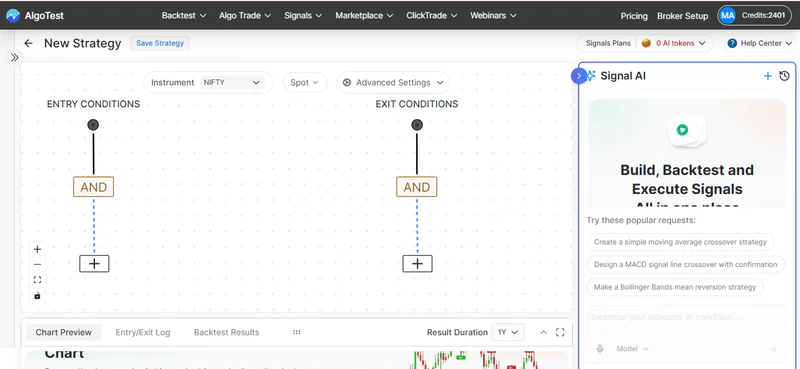
You do not have to start by writing code.
You can describe your trading idea in plain English and use the AI Agent to create the initial signal logic.
For example:
Create a NIFTY intraday signal when the 20 EMA crosses above the 50 EMA and RSI is above 50. Exit when the 20 EMA crosses below the 50 EMA.
Signals AI can convert the instructions into signal logic that you can review and modify.
You can build signals using conditions based on:
Technical indicators
Price
Volume
Indicator crossovers
Indicator comparisons
Logical conditions
Time based conditions
You can also combine multiple conditions to create more detailed trading setups.
This gives you more control over the actual signal logic instead of simply looking for stocks that meet a predefined scan.
Related: How to Automate ADX Indicator Strategy Without Coding
Visualize Your Signals Before Backtesting
Before you test your strategy, you want to make sure the signal is being generated where you expect it to.
Signals AI lets you visualize your signals directly on the chart.
For example, if your strategy generates a buy signal when the 20 EMA crosses above the 50 EMA, you can look at the chart and check where those signals appear.
This can help you identify issues in your logic before you move to backtesting.
It also makes it easier to understand how your conditions behave across different market periods.
Related: EMA Indicator Strategy: How to Automate It Without Coding
Backtest Your Trading Strategy
Once your signal logic looks correct, you can test it against historical market data.
This is an important step because a setup that looks good on a few recent charts may not work consistently over a larger period.
With AlgoTest, you can connect your signal to a trading strategy and backtest it.
You can evaluate metrics such as:
Cumulative P&L
Win rate
Maximum drawdown
Year wise performance
Number of trades
Individual trade results
For example, suppose your intraday signal generated 200 trades over your selected historical period.
You can use the backtest results to understand how that strategy performed instead of relying only on a few successful examples.
A backtest does not guarantee future returns. Actual results can differ because of factors such as slippage, execution delays, liquidity, and live market conditions.
Forward Test Before Going Live
Backtesting tells you how your strategy performed on historical data.
You may also want to see how it behaves with live market data before using real money.
This is where forward testing can help.
With AlgoTest, you can forward test (also known as paper trading) your Signals AI strategy using live market data without deploying real capital.
You can use this stage to check:
Whether signals are generated as expected
How frequently the strategy trades
How the strategy behaves during current market conditions
Whether your execution rules work as expected
This gives you another layer of validation before live deployment.
Popular: 7 Bollinger Bands Strategies for Indian Traders: Intraday, F&O and Swing
Execute Your Signals Automatically
Once you have built and tested your strategy, you can move to live execution through a connected broker.
Instead of manually watching for every signal and placing an order yourself, you can configure the strategy to execute according to your predefined rules.
Your workflow becomes:
Signal condition is met
↓
Trading signal is generated
↓
Strategy executes according to your settings
This takes you from identifying potential trades to running a defined trading process.
Chartink vs AlgoTest for Intraday Trading
Chartink and AlgoTest can serve different needs.
If your main requirement is to screen stocks based on technical conditions, Chartink can be useful.
If you want to build trading signals and take them through testing and execution, AlgoTest offers a more complete workflow through Signals AI.
The key difference is the workflow.
With Chartink, you can use technical conditions to screen the market and identify potential setups.
With Signals AI, you can take those conditions through the full process of building, testing, and executing a trading strategy.
Check out the best paper trading apps for Indicator based strategies
When Should You Consider AlgoTest as a Chartink Alternative?
If you use Chartink mainly to find stocks that match your trading conditions, it can be useful. But if you want to take those conditions further, you may need more than a stock screener.
AlgoTest Signals AI can help if you want to:
Turn technical conditions into trading signals
Backtest your strategy before risking capital
Compare different entry and exit rules
Forward test your strategy with live market data
Automate your trading process
Build, test, and execute signals from one place
Instead of a fragmented workflow like:
Chartink → Find setup → Backtesting platform → Execution platform
you can use:
Signals AI → Build → Backtest → Forward Test → Execute
With Signals AI, you can create your signal logic using AI or the Signals AI Canvas, test it against historical data, forward test it with live market data, and deploy it for live execution through a connected broker.
This makes Signals AI useful when you want to move beyond finding trading setups and build a complete trading workflow around them.
Final Takeaway
A Chartink screener can help you find stocks that match your trading conditions. But if you want to build a systematic strategy, you also need to test, validate, and execute those conditions.
With AlgoTest Signals AI, you can build signals, backtest them, forward test them, and execute them from one place.
Build, Backtest, and Execute With AlgoTest
AlgoTest brings Signals AI, backtesting, forward testing, strategy building, and automated execution together on one platform.
Join 45,000+ traders using AlgoTest to build, test, and automate rule based trading strategies. Get 25 backtests free and start testing your next intraday strategy today.
Additional Resources
Trading Tools
Disclaimer: This article is for educational purposes only and does not constitute investment or trading advice.