Opstra’s strategy builder is a tool inside Definedge’s Opstra platform for building multi-leg options strategies and checking their payoff before you trade. You can use it on Opstra’s free Basic plan, but with two limits: data refreshes every 15 minutes, and a portfolio can hold up to two trades.
Opstra also runs as a mobile app on iPhone and Android. Below, you’ll find what the free plan covers, how to get the app, how to build a strategy, and how Opstra compares with three other builders Indian traders use.
Want to build multi-leg strategies with payoff and Greeks at no cost? Sign up on AlgoTest
Is Opstra’s Strategy Builder Free?
Yes, with limits. The strategy builder is part of Opstra’s Basic plan, and most real-time features sit on the Pro plan.
The 15-minute refresh matters most for intraday traders. A payoff built on prices from 15 minutes ago can look very different from what you’d actually get filled at on a fast day.
Is There an Opstra Strategy Builder App?
Yes. Definedge publishes Opstra as a free mobile app on both stores:
On the App Store, it’s listed as Opstra : Definedge Analysis (iPhone only). The app covers the strategy builder, payoff analysis and position tracking, with P&L for each strategy and for the whole portfolio.
On Google Play, it’s listed as OPSTRA : Definedge.
If you’re searching for a “free download”, install from these official listings only. Third-party APK files of trading apps can be outdated or unsafe, and they can expose your broker login.
On a desktop, Opstra runs in the browser at opstra.definedge.com.
How to Build a Strategy in Opstra
Open Opstra and go to the Portfolio tab, then select Strategy Builder.
Pick the underlying, such as Nifty or an F&O stock, and the expiry.
Add your legs: calls, puts or futures, with strike, buy or sell, and quantity.
Read the strategy chart for payoff, breakeven points and the range of likely outcomes.
Save the strategy to a paper or custom portfolio to track it, or place it through a Definedge account.
Opstra vs Other Option Strategy Builders
For a feature-by-feature look at two of these, read our Opstra Strategy Builder vs AlgoTest comparison.
Where AlgoTest’s Strategy Builder Goes Further
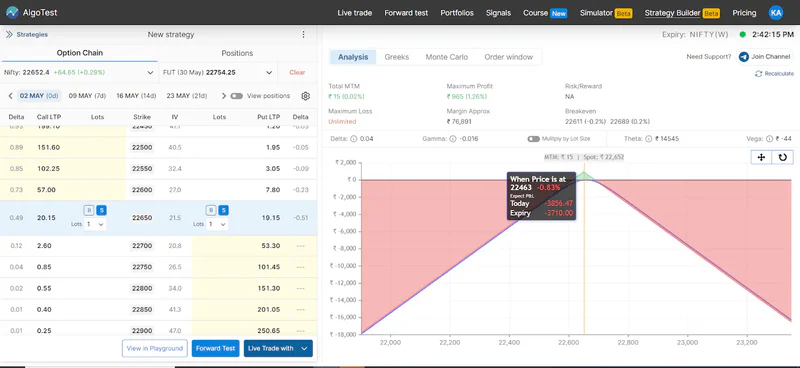
A payoff chart shows what a strategy could do. AlgoTest’s Strategy Builder also helps you check what it actually did.
You can send any position from the builder into the option simulator and replay it on a past trading day, minute by minute.
When you want proof across many expiries rather than one day, the same idea can become a rule-based backtest.
The builder also covers MCX commodity options, so you can build crude oil, gold or silver option strategies in the same place.
Orders go through the broker you already use, not one specific brokerage.
Want to see how your strategy would have played out on last week’s expiry? Build it in the AlgoTest Strategy Builder
Read more: Master the Option Strategy Builder: AlgoTest Tutorial
Pick the Builder That Fits Where You Trade
The best strategy builder is usually the one connected to how you trade. If you already trade through Definedge and care most about volatility charts, Opstra’s builder sits right next to your account. If you’d rather check a structure on real past sessions before placing it with your own broker, a builder linked to replay and testing saves a step.
AlgoTest puts the builder, the simulator and your broker on one screen, so a strategy goes from idea to order without being rebuilt.
Join us as we simplify options trading in India.
Related Reading
FAQs
What is an option strategy builder?
An option strategy builder lets you combine calls, puts and futures into one position and see its payoff before you trade. It shows maximum profit, maximum loss, breakeven points and Greeks for the whole strategy.
Do I need a Definedge account to use Opstra?
Opstra’s full features are tied to a Definedge Securities account, and trades from Opstra are placed through that account. Check Opstra’s sign-up page for what you can access before opening one.
Can I use Opstra’s strategy builder for stock options?
Yes. Opstra’s strategy builder works for Nifty and other index options as well as F&O stocks.
Can I backtest a strategy built in Opstra?
Opstra offers end-of-day backtesting on its Pro plan. If your strategy depends on intraday timing, such as a 9:20 AM entry, you’ll need minute-level data, which AlgoTest’s backtesting and option simulator use.