Dhan TradingCharts costs ₹0 to use. To get live NSE, BSE and MCX prices and place orders from the chart, you need to connect an active Dhan account. In a 27 November launch-week test, Marketcalls saw a 15-minute delay on the standalone site, even after Google sign-in. Connecting Dhan unlocked live prices.
Built-in indicators, layouts, drawing tools and ChartScript are free. Some indicator authors charge a subscription for their scripts, and if you place an order, Dhan's brokerage plus applicable taxes and charges apply.
Raise Financial Services, Dhan's parent company, held its TradingCharts launch in Mumbai on 25 November 2026. Here's what you get at launch, what's still rolling out, and where we fit if you trade options.
Plot the combined premium of the exact strikes you trade, for free on AlgoTest.
Dhan TradingCharts Charges at a Glance
Here's how brokerage adds up. Entering a Nifty straddle as two orders, one call and one put, costs ₹40 in brokerage. Exiting both legs costs another ₹40, so the four executed orders cost ₹80 in brokerage before taxes and other charges.
Plotting those contracts on a chart costs nothing. You can check the full schedule on Dhan's pricing page.
How to Open TradingCharts
On the web, open the TradingCharts terminal at tradingcharts.co. You can sign in with Google to explore it. To see live candles or place an order, connect your Dhan account inside the terminal.
At launch, TradingCharts is available inside the Dhan mobile app. Go to Profile, then Settings, then Traders Control, then Charts, and select TradingCharts.
What's Included in Dhan TradingCharts
Chart types and layouts. Dhan lists 20+ chart types, including Renko, Kagi and point and figure. You can keep up to 8 charts on one screen, for example an index and several option strikes, with intervals from 5 seconds to 12 months.
Order flow and market depth. An order flow chart shows trading activity at each price level inside a candle. Market depth shows buy and sell orders waiting to be filled. Volume profile shows how much traded at each price, and a time price opportunity (TPO) chart counts the time intervals in which the market traded at each price.
Indicators and strategy testing. Dhan announced 200+ free indicators, and the same 27 November test counted 186 in the terminal's built-in library. ChartScript, a Pine-style language, lets you write entry and exit rules and run a backtest. Bar Replay steps through past candles.
Orders from the chart. With Dhan connected, you can place an order from the chart and drag a stop-loss or target to a new price. Options traders also get Scalper, Power Scalper and market depth.
Corporate actions. Charts adjust for corporate actions such as stock splits and bonus issues. Event markers help you see when company news or a corporate action lined up with a price move.
What happened when you entered a Nifty straddle at 9:20 each morning? Test a time-based strategy on AlgoTest with 25 free backtests each week.
What Was Still Rolling Out at Launch
Fuzz AI and screeners. Dhan announced Fuzz AI, which turns a plain-English request into an indicator. In the 27 November test, the Fuzz and Screeners panels were marked "Coming Soon" in the standalone terminal. Dhan has also announced SuperScans signals on its charts.
Price alerts. The same test couldn't find a way to set a regular price alert in the standalone terminal, and the TradingCharts team acknowledged a request to add it.
Saved layouts. Dhan Care said layouts and templates saved on charts.dhan.co need to be set up again in the standalone terminal. It said saved custom indicators should appear after you connect Dhan.
Other brokers. At launch, the standalone terminal offers only Dhan for placing orders. Raise told The Economic Times it plans to open TradingCharts to other brokers, but it gave no date for any specific integration.
Read more: Best AI-Based TradingView Alternative in India
Where AlgoTest Fits for Options Traders
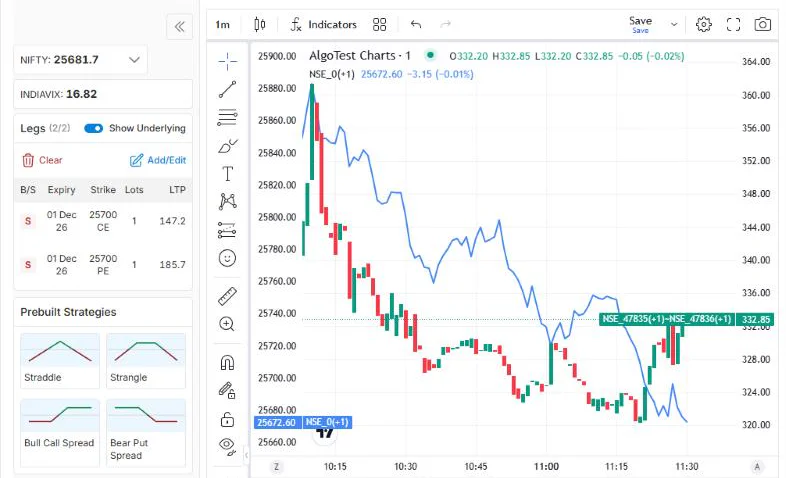
Dhan's Options Trader has a live at-the-money (ATM) straddle chart that follows the current ATM strike as the index moves. Dhan's Strategy Builder also lets you save and compare up to six strategies on its charts.
So the real question is which premium you want to watch, and what you do with it next. A rolling ATM chart and the exact strikes you hold can tell two different stories.
Read more: Dhan vs AlgoTest: Which Option Strategy Builder Should You Use
How to Track the Strikes in a Nifty Straddle

Say the call at your chosen strike costs ₹110 and the put at the same strike and expiry costs ₹90. The combined premium is ₹200.
Later, the call trades at ₹135 and the put at ₹50. The call went up, but the pair fell to ₹185. By then, a rolling ATM chart may already be tracking a different pair of strikes.
To follow your original pair, open AlgoTest Charts, choose Nifty and the expiry, and pick the same strike for the call and the put. Click Plot Chart, then add a moving average to see how the combined premium moves against its own recent average.
The straddle chart shows the ₹15 fall in the premium of your two contracts. Spot movement, changes in implied volatility and the passing of time can all affect that price.
To test a rule such as "flag the first five-minute close below the straddle's 20-period moving average", select Combined Premium in Signals AI, which requires a paid Signal Plan.
You can then choose between two strike settings. Rolling checks your strike criteria on each candle and switches when another strike matches. Fixed selects each leg's strike once, at the time you set, and keeps it for the rest of that session.
Replay a past expiry day on the Option Simulator and watch how the pair's combined premium changed minute by minute.
From Chart to Live Strategy
After a backtest, try paper trading to see when the same rule triggers at live prices. If you're still choosing where to practise, our guides to paper trading websites in India and virtual trading apps compare the tools available.
If you want to automate the rule later, check that the platform supports your broker and the type of order you need. Our algo trading software comparison covers broker support and execution costs.
Build a Tested Plan Around the Premium You Trade
Dhan TradingCharts is a useful choice if you want order flow, several charts on one screen and orders through Dhan. For a Nifty straddle, first decide whether you want to watch the current ATM strike or the two contracts you hold. That choice decides which premium you should use to test your rule.
AlgoTest helps you move from that chart to a strategy you can inspect and test before deciding whether to deploy it.
Join us as we simplify algo trading in India.
Related Reading
FAQs About Dhan TradingCharts
Is Dhan TradingCharts free?
Yes. The platform, built-in indicators, drawing tools, layouts and ChartScript cost ₹0. Authors set the prices for optional premium indicators. If you trade, Dhan's usual brokerage and other applicable charges apply.
Do I need a Dhan account for live data on TradingCharts?
Yes. In the 27 November launch-week test, charts stayed on a 15-minute delay after Google sign-in until a Dhan account was connected. Connecting an active Dhan account unlocks live NSE, BSE and MCX data and orders from the chart.
How much brokerage do I pay when trading from TradingCharts?
Dhan charges ₹20 per executed options order, plus taxes and other charges. A two-leg Nifty straddle costs ₹40 to enter and another ₹40 to exit.
Is TradingView still available on Dhan?
Yes. At launch, Dhan's founder said TradingView remained the default. TradingCharts is Dhan's own charting product, offered alongside it.
Does Dhan TradingCharts have price alerts?
Not at launch. The 27 November test couldn't find a regular price alert in the standalone terminal, and the TradingCharts team acknowledged the feature request.
Does TradingCharts work with Zerodha or other brokers?
Not yet. At launch, the standalone terminal offers only Dhan for placing orders. Raise plans to support other brokers but had announced no date for Zerodha or any other broker as of 27 November.
What can I use for free on AlgoTest?
AlgoTest Charts is free, including straddle, strangle and custom charts of up to 6 legs. Every account also gets 25 free time-based backtests per week. In the Simulator Charts tab, the free plan shows chart data for the current date, and a paid plan adds previous dates. Signals AI requires a paid Signal Plan.
Can I use AlgoTest with my Dhan account?
Yes. You can test a strategy on AlgoTest and execute it through a connected Dhan account. AlgoTest supports 65+ brokers overall.