Groww algo trading means running a rule-based strategy that places orders in your Groww account automatically. Groww’s own tools for this are APIs that need code, so most traders who don’t code build and test the strategy on a no-code platform, then connect Groww for live orders.
On AlgoTest, you backtest the rules, forward test them with virtual money, then connect Groww. Algo execution is free for Groww users on AlgoTest, though broker-side charges are always applicable.
Groww places the orders. Your rules should be tested first. Build and backtest your strategy free on AlgoTest
Does Groww Offer Backtesting?
Groww offers Backtesting APIs for traders who write their own code. They give you:
Historical OHLC (Open, High, Low, Close) data for all instruments
Volume for tradable instruments (Equities and FNO)
Open Interest (OI) for FNO
Currently, Backtesting APIs only support CASH and FNO segments, and data of FNO instruments are available from 2020. To use them, you need an active Trading API subscription, which Groww prices at ₹499/month (plus taxes).
This gives you raw data, not a finished test. You still have to code strike selection, entry and exit times, stop-losses and costs.
A no-code route splits the work into three stages:
You can run the backtest with just an AlgoTest account. You only need to connect Groww when you go live.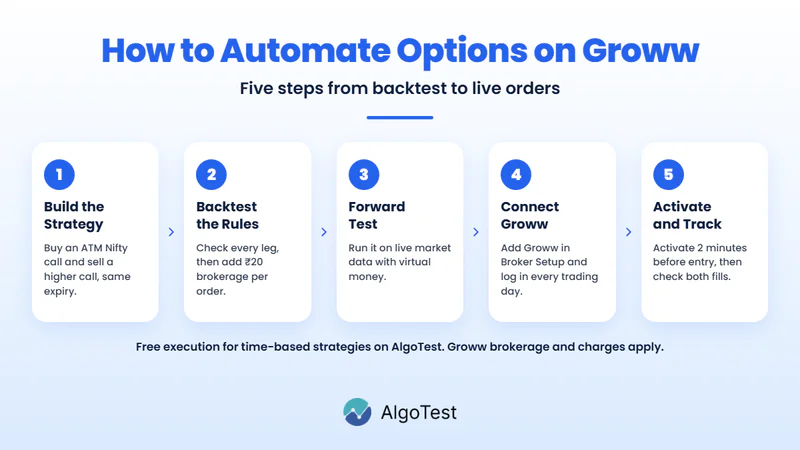
Step 1: Build a Nifty Bull Call Spread
A bull call spread has two legs: you buy one call and sell another call at a higher strike, with the same expiry and quantity. The bought call gains if Nifty rises. The sold call lowers your upfront cost but caps your maximum gain.
Use these settings in the time-based strategy builder:
Strikes are picked at entry and stay fixed while the trade is open. For example, if the ATM strike is 25,000 and strikes are 50 points apart, you buy the 25,000 call and sell the 25,200 call.
Save the strategy with a clear name, such as “Nifty 9:30 Bull Call Spread”, then choose a date range and run the backtest.
AlgoTest offers its users 25 free backtests every week on Monday. Run this spread on past Nifty sessions
Step 2: Check the Trades and Add Groww’s Charges
Open a few days in the backtest report and check:
Both calls share the same expiry.
The sold strike is above the bought strike.
The quantities match on both legs.
Each leg exits at the time you set.
Here is a simple trade with illustrative premiums:
Multiply the ₹10 by the lot size of that contract to get the gross profit in rupees.
Then subtract costs. Brokerage charges apply on Groww (₹20 per order). The spread uses two orders to enter and two to exit, so that’s ₹80 in brokerage per trade, before taxes, exchange fees and slippage.
Look beyond total profit in the report. AlgoTest’s backtest results show terms like Overall Profit, Max Profit in a Single Trade, Returns/Max Drawdown, Expectancy Ratio and Max Losing Streak. A small profit per trade can disappear after costs.
Once you’ve settled on the settings, test them on a later date range you kept aside. If they still hold up on data you didn’t use to choose them, you can trust the results more.
Step 3: Forward Test With Virtual Money
A forward test runs the saved strategy on live market data without real orders. To do a Forward Test on AlgoTest you need to buy a Forward Test Execution Plan, and it isn’t part of the free Groww offer.
You have to activate your strategy daily, and at least 2 minutes before your entry time. Each day, note:
Whether both legs entered.
Which strikes were picked.
The simulated entry and exit premiums.
Forward testing is AlgoTest’s version of paper trading. If you want to practise elsewhere first, compare these paper trading websites and virtual trading apps. Keep in mind that real Groww fills will still depend on live prices.
Step 4: Connect Groww to AlgoTest
What you need:
An AlgoTest account.
A Groww demat account with F&O activated.
Groww API access.
Steps:
Log in to AlgoTest and open Broker Setup at the top right.
Search for “Groww” and click Setup.
Enter your Groww client code and complete the setup and login prompts.
Check that the connection shows as logged in before you deploy.
Groww’s Trading API uses OAuth 2.0 for secure authentication, and tokens expire daily. That’s why you log in again each trading day.
Related: Best Brokers for Algo Trading in India
Step 5: Set Execution and Go Live
Open Algo Trade, find your saved strategy and click Activate. Your execution settings open as soon as you do. Choose Groww, check the quantity, and set your order types.
Before market open each day:
For NSE/BSE brokers, you must log in to your broker via AlgoTest every trading day (exchange requirement).
A strategy can only be activated if the entry time is a minimum of 2 mins after the current time. For the 9:30 AM example, activate by 9:28 AM.
If you run a portfolio with auto execution, log in to your broker before 9:15 AM, or it won’t start that day.
After entry, check that both legs filled at the right quantity. If one leg is rejected, check the reason and your Groww positions before retrying, because a spread with only one leg is not the trade you tested. After the exit, confirm both positions closed, then compare the real fills and charges with your forward test.
Related: Groww vs Zerodha: Charges, Features and Which Is Better for You
What Groww Algo Trading Costs Through AlgoTest
Details checked on 20 November 2026:
Groww’s standalone API price is ₹499/month (plus taxes).
Other Ways to Automate on Groww
If you code, you can build on Groww’s API and run strategies on Groww Cloud, its broker-integrated cloud execution platform.
If you don’t, AlgoTest isn’t the only option. Groww also publishes setup guides for Cirrus.trade and Quantiply. To compare more tools, see this list of the best algo trading software in India.
Backtesting also works differently at other brokers, such as Zerodha, Upstox and Dhan.
Prove the Spread Before Groww Places It
A bull call spread looks simple, but the result depends on the strikes, the timing and four orders’ worth of costs. Write down your entry, exit, strikes and position size, then check how those rules hold up on past data and in a forward test before any real order goes to Groww.
AlgoTest helps you turn a trade idea into a strategy you can test, review and automate before you decide to deploy it. Join us as we simplify algo trading in India.
Related Reading
FAQs
Can I do algo trading with Groww without coding?
Yes. You can build a time-based options strategy on a no-code platform like AlgoTest and connect Groww for live orders.
Does Groww have its own backtesting tool?
Groww offers Backtesting APIs that return historical candles and contract details. You need to write code to use them.
Do I need to connect Groww before backtesting?
No. You can backtest on AlgoTest first. You only need Groww connected, logged in and funded when you go live.
Is Groww algo trading free on AlgoTest?
Algo execution is free for Groww users, and no AlgoTest credits are required for time-based and 920 strategies. Groww’s brokerage, statutory charges and separately priced features such as forward testing still apply.
Do I need to log in to Groww every day?
Yes. For NSE/BSE brokers, you must log in via AlgoTest every trading day. For portfolio auto execution, log in before 9:15 AM.