Paper trading options lets you test a strategy using simulated trades instead of real capital. Market prices and strategy conditions are tracked, but no order is sent to your broker.
When you combine paper trading with an algo, you do not need to place every virtual trade manually. The system monitors your predefined rules and simulates the entry and exit when those conditions are met.
AlgoTest calls this process Forward Testing. This guide explains how to build, backtest and forward-test an options strategy using the updated AlgoTest workflow in 2026.
What Is Paper Trading in Options?
Paper trading is a simulated form of trading. You select an options contract, define the position and monitor how it performs without using real money.
You can paper trade individual calls and puts or multi-leg strategies such as:
Straddles
Strangles
Iron condors
Credit spreads
Debit spreads
Butterflies
Calendar spreads
Options paper trading helps you understand how strike selection, expiry, volatility and time decay affect a strategy.
If you are new to the process, read our beginner’s guide to paper trading before creating an automated strategy.
Backtesting vs Paper Trading vs Live Trading
Backtesting and paper trading are both validation methods, but they answer different questions.
The recommended workflow is:
Build → Backtest → Paper Trade → Go Live
Backtesting helps you reject weak ideas quickly. Paper trading shows whether the same rules behave as expected on unseen market data. Live trading should come only after both stages.
Read our detailed comparison of paper trading vs live trading before moving from simulated to real orders.
Why Use an Algo for Options Paper Trading?
Manual paper trading is useful for practising order placement. Algo-based paper trading is better suited to testing a complete rule-based strategy.
It lets you:
Apply the same entry and exit rules every day
Test multi-leg options strategies
Use fixed strike-selection rules
Add stop-losses, targets and trailing conditions
Monitor a strategy without watching the screen continuously
Compare forward-test results with a historical backtest
Record trades without maintaining a manual spreadsheet
An algo also removes discretionary changes from the test. If you keep changing the rules after every losing trade, you cannot judge whether the original strategy works.
Two Ways to Paper Trade Options on AlgoTest
AlgoTest supports two main types of paper-trading workflows.
1. Time-Based Options Strategies
Use the 920 Strategy Builder for strategies that enter or exit at a fixed time or use features such as momentum, range breakout and re-entry.
Examples include:
Entering a straddle at 9:20 AM
Selling an OTM strangle at a fixed time
Trading only on selected weekdays
Using a stop-loss or overall strategy target
These strategies are activated from the main Forward Test section.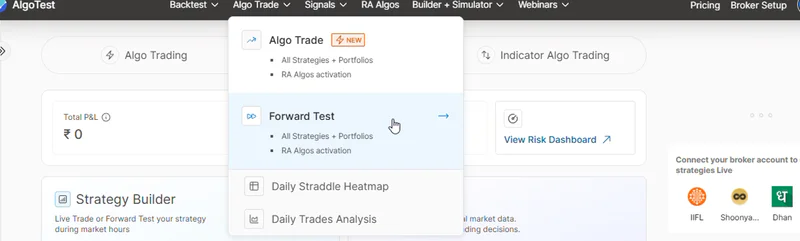
2. Indicator-Based Options Strategies
Use Signals AI when your entry depends on indicators or chart conditions.
For example:
Buy an ATM call when RSI crosses above 55
Sell an ATM put when SuperTrend turns bullish
Enter when price is above VWAP and MACD confirms momentum
Trade only when conditions agree across two timeframes
Signals AI lets you describe the conditions in plain language or build them on a visual canvas. The signal can then trigger an options or futures trade configuration.
Check out the best Paper Trading websites in India
How to Paper Trade Options Using AlgoTest
Step 1: Create Your AlgoTest Account
Create an AlgoTest account and log in to the dashboard.
You do not need to connect a broker to place simulated orders. A broker connection is required only when you decide to move to live algo trading.
Step 2: Define Your Strategy Rules
Before opening the Strategy Builder, write down the complete strategy.
Your rules should define:
Underlying index or stock
Entry and exit times
Option expiry
Call or put
Buy or sell position
Number of lots
Strike-selection method
Stop-loss
Target
Re-entry or adjustment rules
Days on which the strategy can trade
Avoid rules such as “enter when the chart looks bullish.” An automated paper-trading strategy needs exact conditions.
Step 3: Create the Options Strategy
For a time-based strategy, open the Strategy Builder and configure:
Strategy type: Select intraday or positional, depending on the setup.
Underlying: Choose NIFTY, BANKNIFTY, FINNIFTY, MIDCPNIFTY, SENSEX or another supported instrument.
Entry and exit: Set the required trading times.
Option legs: Select the expiry, position, option type and strike criteria.
Risk settings: Add individual or overall stop-losses, targets and other required conditions.
Save: Give the strategy a clear name so you can find it during deployment.
For indicator-based trading, go to Signals AI. Create your signal conditions, connect them to an options trade and save the complete strategy.
Step 4: Backtest the Strategy First

Do not begin paper trading only because a strategy looks logical. Test it against historical data first.
Review:
Net profit or loss
Maximum drawdown
Win rate
Average profit and loss
Number of trades
Winning and losing streaks
Year-wise consistency
Performance after estimated trading costs
A high win rate alone does not make a strategy suitable. A strategy can win frequently but still lose money if its average loss is much larger than its average profit.
Use this step-by-step options backtesting guide to understand the process.
Step 5: Get the Required Forward Test Plan
Time-based strategies require an active Forward Test execution plan. You can purchase or manage the plan from the pricing section of your AlgoTest account.
Plan limits and credit requirements can change, so check the current execution pricing documentation before activation.
Signals AI follows its own plan and deployment limits. Check the plan shown in your account before deploying a signal.
Step 6: Activate a Time-Based Strategy
To forward-test a time-based options strategy:
Open Forward Test from the dashboard.
Find the strategy under the Strategies section.
Click Activate.
Confirm that the strategy appears under Deployed Strategies with the status Running.
Activate it at least two minutes before its entry time.
A manually activated time-based strategy usually needs to be activated for each trading day. You can also review the available Auto Activation settings for eligible strategies.
Refer to the current Forward Test documentation for the latest dashboard flow.
Step 7: Deploy an Indicator Strategy
To forward-test a Signals AI strategy:
Go to Signal → Signal Dashboard.
Open Signals AI → Saved Signals.
Find the saved signal.
Click Forward Test.
Check that the deployment appears under Signals AI → Forward Test with the status Listening.
Listening means that the signal is monitoring live prices for your conditions. Signals AI forward tests remain in the Listening state until you pause or delete them, so daily reactivation is not required.
See the Signals AI Forward Test guide for the current controls.
Step 8: Monitor the Paper Trade
After the strategy meets its entry conditions, you can monitor the simulated position from the relevant Forward Test dashboard.
Depending on the strategy type, you can review:
Running profit or loss
Entry and exit details
Individual option legs
Triggered conditions
Strategy logs
Open and completed trades
Paused or running status
Time-based strategies provide controls such as Square Off and Switch to Manual. Signals AI provides controls to pause listening, resume monitoring, inspect logs or delete the deployment.
Example: Paper Trading a 9:20 Straddle
Suppose you want to test a time-based NIFTY straddle. You could use the following sample configuration:
This example is for learning how to configure the platform. It is not a strategy recommendation.
Backtest the setup across different periods before forward testing it. Then monitor it over several market conditions instead of judging it after one or two trades.
What Options Paper Trading Can and Cannot Test
Paper trading provides useful information, but simulated results will not match live trading exactly.
A simulated position may fill at the displayed price even when a real order would be affected by a wide bid-ask spread or insufficient volume.
This is especially important when testing far OTM strikes or contracts close to expiry.
How Long Should You Paper Trade Options?
There is no fixed number of days that works for every strategy. Your test should include enough trades and different market conditions to produce useful evidence.
Where strategy frequency permits, aim to review at least 50 to 100 trades or several expiry cycles. Include:
Trending markets
Range-bound sessions
High-volatility periods
Expiry and non-expiry days
Winning and losing streaks
Compare your forward-test results with the backtest. Some difference is normal. A large difference may point to a problem with signal timing, strike selection or your assumptions.
Common Options Paper-Trading Mistakes
Avoid these mistakes while evaluating your strategy:
Starting without a historical backtest
Using more virtual capital than you could use live
Ignoring brokerage, taxes and slippage
Testing illiquid strikes without checking volume
Changing the rules after every loss
Judging a strategy after only a few trades
Assuming simulated fills will match broker execution
Moving to live trading with the full intended position size
Paper trading should help you find weaknesses before real capital is involved. It should not be used only to confirm that a strategy you already like is profitable.
Conclusion
Automated options paper trading helps you test a complete strategy on live market data without sending orders to a broker. It is most useful after backtesting and before live deployment.
On AlgoTest, you can use Forward Test for time-based options strategies or Signals AI for indicator-based setups. Monitor enough trades, compare the results with your backtest and investigate major differences before considering live execution.