To find the FINNIFTY spot chart on TradingView, search for NSE:CNXFINANCE. For the continuous futures chart, search for NSE:FINNIFTY1!. Choose the spot chart to analyse the underlying index, or the futures chart to follow futures prices.
For options analysis, start by identifying the trend and key price levels on the chart. Then use the FINNIFTY option chain on AlgoTest to compare strikes, expiries and premiums.
How to Find FINNIFTY on TradingView
Open TradingView’s chart and select the symbol search.
Enter CNXFINANCE or Nifty Financial Services.
Select the NSE index result to open the spot chart.
Choose your timeframe and add the symbol to your watchlist.
You can also open the Nifty Financial Services chart on TradingView directly.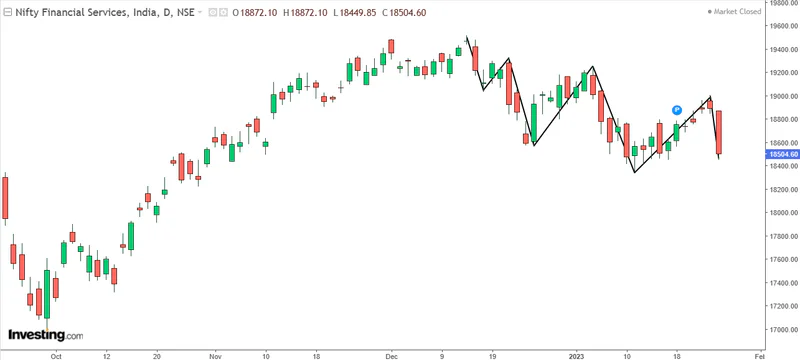
Image via Investing.com
FINNIFTY covers a broader financial-services basket than Bank Nifty. Understanding which companies FINNIFTY tracks helps explain why the two indices can move differently.
FINNIFTY Spot vs Futures vs Options Charts
Futures can trade above or below spot. An option’s premium also responds to time remaining and implied volatility. A breakout on the spot chart therefore does not mean an option premium will rise by the same number of points. For a clearer explanation, read how spot, futures and options chart data differ.
Is the FINNIFTY Chart on TradingView Live?
Check the chart’s data status before using it for intraday decisions. An updating chart can still display delayed prices.
TradingView shows a “Data is delayed” message when the selected feed is delayed. Real-time access depends on the exchange, your account status and data entitlements. A paid charting plan does not automatically include every exchange’s real-time data fees.
To check what applies to your chart, click its market-status indicator. Follow TradingView’s instructions for checking and enabling real-time market data.
When comparing TradingView with your broker or AlgoTest Charts, match the instrument, contract expiry, timeframe and timestamp first. Comparing spot with futures can look like a feed error even when both prices are correct.
A Simple FINNIFTY Chart Setup
Start with price levels and a small number of indicators. Each element should answer a specific question.
These settings are an example layout, not a tested FINNIFTY strategy. A 20-period EMA on a 15-minute chart uses 20 fifteen-minute candles, not 20 trading days.
RSI above 70 does not automatically mean “sell”, and RSI below 30 does not automatically mean “buy”. A strong trend can persist at either extreme. Define what price must do before entering and what would invalidate the setup.
For more detail on interpreting candles and timeframes, the FINNIFTY live-chart guide covers the basics. The FINNIFTY stocks and weightage also help you identify which constituents may be contributing most to an index move.
Want to test a chart-based idea? Write down the entry, exit and risk rules before checking its historical results.
Combine the FINNIFTY Chart With Option-Chain Data
A chart helps you form a view on price. The option chain helps you assess the contracts available to express that view.
Work through these checks:
Choose the expiry. Match it to your planned holding period. NSE’s FINNIFTY contract specifications list three consecutive monthly expiries. Check the FINNIFTY expiry schedule for the relevant date and holiday adjustments.
Compare nearby strikes. Consider their premiums and sensitivity to the underlying move, rather than choosing solely by the lowest premium.
Inspect liquidity. Check trading activity and the current bid-ask spread in your trading platform. A displayed last traded price may differ from the price available now.
Review OI and changes in OI. These show outstanding contracts and changes in positioning. High call OI does not guarantee resistance, and high put OI does not guarantee support. Every open contract has both a buyer and a seller.
Check volatility and time decay. A correct directional view can still lose money if the move is too small or too late, or implied volatility falls.
The FINNIFTY option-chain analysis guide explains these fields in more detail. Before sizing a position, confirm the applicable quantity in the Nifty, Bank Nifty and FINNIFTY lot-size guide and your broker’s contract details.
Example: A Breakout Does Not Automatically Make a Call Attractive
Suppose FINNIFTY closes above a resistance level you marked earlier. That meets one chart condition, but it does not settle which option to buy.
The call you are considering could have a wide spread, little trading activity or a premium inflated by high implied volatility. Review those conditions and the planned exit before entering. If the contract does not meet your liquidity or risk rules, skip the trade.
Can You Connect TradingView Alerts to AlgoTest?
Yes. AlgoTest Signals supports connecting TradingView alerts to configured strategies. Follow AlgoTest’s step-by-step instructions for connecting a TradingView indicator to set up the webhook and alerts.
The basic workflow is:
Define the chart symbol, timeframe and entry and exit conditions.
Configure the FINNIFTY strategy and contract selection in AlgoTest.
Connect the TradingView alerts using the supplied webhook details.
Forward test the setup and inspect the triggered entries and exits before live deployment.
Check that your TradingView plan supports the required alerts and webhooks. For FINNIFTY trading on AlgoTest, also confirm your broker’s current instrument and order restrictions directly with the broker.
Keep chart signals and options results separate when evaluating a strategy. A backtest on the spot index alone does not establish the profit or loss of an options strategy with changing strikes, premiums and expiries.
Conclusion
Start with the correct FINNIFTY symbol, verify the data feed and define your chart conditions. Then compare the available contracts in the FINNIFTY option chain before deciding whether a trade fits your rules.
Use AlgoTest to test the strategy and review its losing periods as carefully as its profitable ones.