Backtesting on an option simulator means replaying past market days on real historical option chain data and trading your strategy on each day as if it were live. It shows how your rules would have worked before you risk real money.
Here is the process in short:
Write down your entry, exit and stop loss rules before you start.
Pick 20 past days that cover trending, sideways and expiry sessions.
Replay each day on an option simulator and trade it strictly by your rules.
Log every trade, then read your win rate, average loss and worst stretch.
Option Simulator vs Rule-Based Backtesting
There are two ways to backtest options. A historical replay simulator lets you trade past days by hand, minute by minute. A rule-based backtester runs fixed rules across years of data in seconds.
Use the simulator when your strategy needs judgment, such as deciding when to adjust a leg. Use a rule-based backtest when every rule can be written as a fixed condition. Our guide on how to backtest options trading strategies covers that method.
How to Backtest a Strategy on an Option Simulator
Step 1: Write Your Strategy Rules
A backtest only works if the rules are fixed before you start. If you decide the rules while watching the replay, you are guessing with hindsight, not testing.
Write these down:
The instrument and expiry you will trade, such as the nearest Nifty expiry.
The entry time and how you will pick strikes.
The stop loss and target, in points or rupees.
The exit time if neither the stop loss nor the target is hit.
Any adjustment you allow, and exactly when it happens.
Step 2: Pick 20 Past Days
Twenty days is a sensible minimum for a manual backtest. Fewer days can make one lucky week look like a good strategy.
Mix the days so the test sees different markets:
Pick 5 days when the market trended up.
Pick 5 days when the market trended down.
Pick 5 sideways days with a narrow range.
Pick 5 expiry days or event days, such as a Budget day.
Choose the dates before you look at how those days moved. Picking days after seeing the result is the most common way manual backtests go wrong.
Step 3: Load the Day and Build Your Position
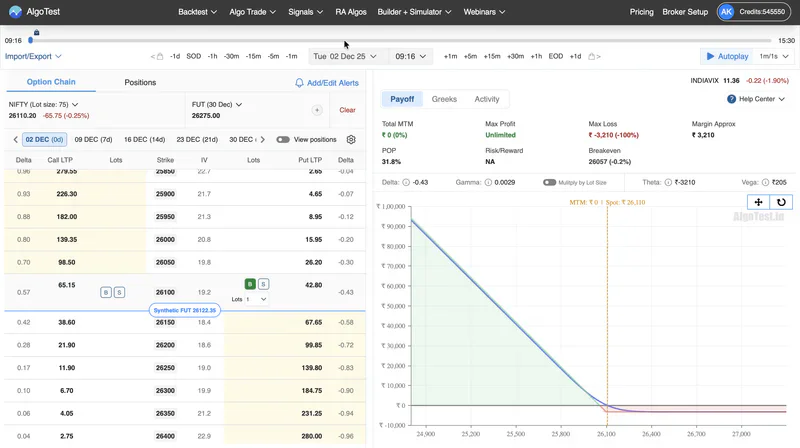
On the AlgoTest Option Simulator, pick the index, a past date and your entry time. The simulator loads the real option chain for that moment, with the strikes and premiums traders actually saw.
Build your position on the chain, from a single leg to a straddle, strangle or spread. Before you start the replay, check the payoff graph for max profit, max loss and breakeven, so you know your risk upfront.
Step 4: Replay the Day and Follow Your Rules
Start AutoPlay and let the day run. You can control the replay speed, so slow it down when the price gets close to your stop loss or target.
You can add, adjust or square off legs mid-replay, but only when your written rules say so. Watch how option Greeks like Delta and Theta change as the day moves, since they explain why your P&L moves.
Step 5: Log Every Trade
The simulator shows each day’s result, but you need one record across all 20 days. A simple sheet is enough:
The last column matters most. If you broke a rule on a day, mark it, because that trade tests your discipline, not your strategy.
Step 6: Read Your Results
Once all 20 days are logged, look at four things:
Win rate is the share of days that ended in profit, so 12 winning days out of 20 is a 60% win rate.
Average win and average loss show whether your wins are big enough to cover your losses.
Max drawdown is the biggest fall from a peak in your running P&L, which shows the worst stretch you would have lived through.
Results by day type show where the strategy breaks, such as on trend days or expiry days.
A high win rate can still lose money if the losses are bigger than the wins. Always check the averages before you trust the win rate.
Example: Backtesting a Short Straddle on 20 Days
Say you test a short straddle on Nifty. You sell the ATM call and put at 9:20 AM, with a stop loss on the combined premium and a time exit at 3:15 PM.
After 20 replays, you might find it wins on most sideways days but loses on trend days and sharp expiry moves. That pattern tells you more than the total P&L. It suggests a filter, like skipping gap-opening days, which you would then test on 20 new days.
Common Mistakes in Simulator Backtesting
Many traders pick days after seeing how they moved, which makes almost any strategy look good.
Changing the rules halfway through a replay turns the test into hindsight.
Ignoring brokerage, taxes and slippage makes simulated P&L look better than live P&L.
Testing only one type of day hides how the strategy behaves in other markets.
Stopping after a few winning days leaves too small a sample to trust.
What to Do After a Simulator Backtest
A simulator backtest is the first filter, not the final proof. If your strategy holds up across 20 days, take these next steps:
Turn the rules into a rule-based backtest on AlgoTest to check them across years of data.
Forward test the strategy with paper trading on live prices for a few weeks.
Trade it live only after that, starting with a small position size.
Results often differ between these stages. Our guide on why backtest, forward test and live results differ explains why.
Build a Tested Strategy From Your Replays
Start with one strategy and write its rules: the market context, entry, exit and position risk. Replay it across 20 past days of different types, log every trade, and keep only the rules that survive both calm and volatile sessions.
AlgoTest helps you move from an idea to a strategy you can inspect and test before deciding whether to deploy. You can start with the AlgoTest Option Simulator and move on to rule-based backtests and paper trading on the same platform.
Join us as we simplify retail trading in India.
Related Reading
FAQs
Can you backtest on an option simulator?
Yes. An option simulator replays real historical option chain data, so you can trade past days by hand and record the results. This is called manual backtesting.
How many days should I backtest on an option simulator?
Twenty days is a sensible minimum, mixed across trend, sideways and expiry days. More days give you more reliable results.
What is the difference between an option simulator and a backtest?
An option simulator lets you trade past days by hand, minute by minute. A rule-based backtest runs fixed rules across years of data automatically.
Is the AlgoTest Option Simulator free?
Yes. You can start the AlgoTest Option Simulator for free on real historical option chain data, with no broker account needed.
Which instruments can I backtest on the AlgoTest simulator?
You can replay index options on Nifty, Bank Nifty, FinNifty, Midcap Nifty, Sensex and Bankex, plus stock options and crypto.
Is manual backtesting on a simulator reliable?
It is as reliable as your discipline. If you fix the rules first, pick the days in advance and include costs and slippage, the results are a fair guide to how the strategy behaves.