If you want to create trading signals with AI, you no longer need Pine Script, coding knowledge, or third-party integrations. Signals AI lets you describe your strategy in plain English, build it visually, and deploy it, without writing a single line of code.
Most traders assume signal automation is only for developers. It is not. Here is how to do it from scratch.
What Is AI Trading Signal Creation?
AI trading signal creation means converting a trading idea into structured entry and exit rules using artificial intelligence.
You describe what you want. The AI translates it into executable logic. This cuts setup time, removes technical complexity, and makes automated trading accessible to anyone.
You do not need to know how to code, set up webhooks, or understand broker APIs to get started.
Step 1: Describe Your Strategy in Plain English
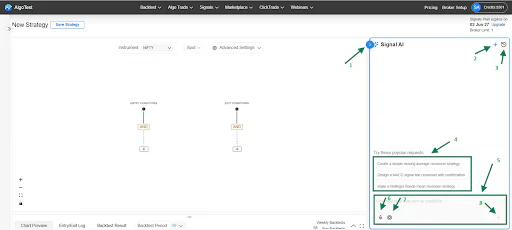
The Signals AI chatbot is where you start. Type your strategy as you would explain it to another trader. The AI reads your input and builds the entry and exit conditions automatically.
You can also refine it through follow-up prompts. Type "change the timeframe to 15 minutes" and it updates instantly. No need to rebuild from scratch every time you want to adjust a condition.
Other things the chatbot supports:
Suggested Prompts for ready-made strategy templates
History tab to access and reuse previous strategies
Voice input in Hindi, English, Gujarati, and Marathi
AI model selection: Fast, Advanced, Super, or Pro based on strategy complexity
Step 2: Select Your Instrument

Signals AI supports signal creation across three asset categories, so you can run the same workflow whether you trade indices, stocks, or crypto.
Indices: NIFTY, BANKNIFTY, SENSEX, MIDCPNIFTY, FINNIFTY, BANKEX
Stocks: All NSE Futures and Options enabled stocks
Crypto: BTCUSD, ETHUSD
Step 3: Pick Your Indicators

Choose from trend and momentum indicators to define your signal logic. These can be used individually or combined for multi-condition strategies.
Trend: EMA, SMA, WMA, VWMA, SuperTrend, ADX, VWAP
Momentum: RSI, MACD, Stochastic, ROC, Williams %R, Bollinger Bands, ATR
Step 4: Fine-Tune on the Canvas

The AI canvas is a visual, no-code strategy builder and the most important part of the workflow.
Every indicator is a node. You add nodes, set parameters, and connect them with comparison operators to define when your strategy enters and exits. What the AI generates in seconds, the canvas lets you control precisely.
Here is what you can do:
Set entry and exit conditions
Each rule connects two indicator nodes with a comparison: Crosses Above, Crosses Below, Greater Than, Less Than, and so on. Entry conditions open a trade. Exit conditions close it.
Combine conditions with AND / OR logic
You are not limited to one condition per rule. Stack multiple conditions together. For example: entry when EMA 20 crosses above EMA 50 AND RSI is above 55. AND requires all conditions to be true. OR requires anyone to be true. This filters out weak signals and improves accuracy.
Add a time-based exit
For intraday strategies, add a time-based exit node to close the position at a fixed time regardless of indicator conditions. Useful for squaring off before market close.
Build from scratch or refine AI output
The canvas works both ways. Most traders let the AI generate the base logic and use the canvas to fine-tune. That combination is faster than building manually and more precise than relying on AI alone.
This is particularly useful in the context of algo trading in India, where intraday strategies require tight execution rules and precise condition management. The canvas makes that level of control available without writing a single formula.
Go through the Signals AI Product documentation for a complete walkthrough.
Step 5: Configure Data Points
Each indicator node lets you control what data it reads. This makes signal conditions more precise.
You can set:
Price source: open, high, low, or close
Timeframe and candle interval
Offset to reference a previous candle's value instead of the current one
Getting these right is what separates a well-timed signal from one that triggers late or at the wrong price.
Step 6: Control Signal Behaviour with Advanced Settings
Two settings control how your signal executes once conditions are met.
Max Concurrent Signals defines how many trades can be active at the same time. Set to 1 and a new entry will not trigger until the previous position exits. Set to Unlimited and the strategy can take multiple entries whenever conditions are met.
Max Signals in a Day caps the total number of entries per session. This prevents overtrading when conditions trigger repeatedly in a volatile market.
Why This Works Better Than Traditional Signal Building
Traditional signal building means writing code, debugging it, connecting broker APIs, and maintaining alerts every time something breaks.
Signals AI replaces that with three steps: describe your strategy, refine it visually, and configure execution rules. A strategy that previously took days to build and test now takes minutes.
Related: Trading Signals: Build, Backtest & Automate Without Coding or TradingView
What Comes After Signal Creation?
Once your signal is built, the next steps are:
Chart Preview: See where your signals would have triggered on historical charts before risking capital (learn more: How to Analyze Trading Signals on Charts)
Backtesting: Run the strategy against historical data to review win rate, drawdown, slippage, and P&L
Forward Testing: Run in live market conditions without committing full capital
Live Automation: Deploy for automated execution once the strategy is ready
Related: 10 Best TradingView Alternatives in 2026
Start Building Trading Signals with AI
Signal automation is not just for developers. Whether your strategy is a simple EMA crossover or a multi-condition momentum setup, Signals AI gives you the tools to build it fast and refine it precisely.
Describe your strategy, use the canvas to get it right, and go live with confidence. The first signal takes a few minutes. Everything after that is just iteration.
Simplifying algo trading for retail traders in India.
Trading in derivatives involves significant risk of loss. AlgoTest does not provide financial advice. Backtest results are based on historical data and do not guarantee future performance.