Nifty option historical data is the past price record of Nifty options contracts, including ones that have already expired. NSE publishes it for free as end-of-day data. For each contract and each trading day, you get the open, high, low, close, settle price and open interest.
End-of-day data shows one set of prices per day. To see what a contract cost at a specific minute, you need a tool that replays the option chain, such as AlgoTest’s option simulator.
Quick answer: can you download it? Yes. NSE lets you download any contract’s daily data as a CSV file, and its daily F&O bhavcopy holds every contract for one day. NSE’s free reports don’t include minute-by-minute option prices.
Want to test a strategy on years of Nifty option data? Sign up to get 100 Backtests free/month
Where to Find Nifty Option Historical Data
Use NSE when you need daily numbers in a spreadsheet. Use the simulator when you need to see what the chain looked like at a specific moment.
How to Backtest a Strategy on an Option Simulator
Step 1: Find an Expired Contract in NSE’s Report
We’ll use one expired contract as an example: the Nifty 22,000 put that expired on 6 June 2024.
This contract makes a good example because of 4 June 2024, the Lok Sabha election result day. Nifty opened at 23,179.50, fell to an intraday low of 21,281.45 and closed at 21,884.50, down 5.93%. That day, the 22,000 put went from out of the money to in the money and back near the money.
Here’s how to pull its data:
Open NSE’s Historical Contract-wise Price Volume Data page.
Choose Index Options as the instrument and NIFTY as the symbol.
Select 2024 as the year and 06-Jun-2024 as the expiry.
Choose PE as the option type and enter 22000 as the strike price.
Set the date range from 3 June 2024 to 6 June 2024 and load the data.
Click the download link to save the table as a CSV file.
Each row shows one trading day for that contract. The columns cover open, high, low, close, last traded price, settle price, number of contracts, turnover, open interest, change in open interest and the underlying value.
Nifty options expired on Thursdays in 2024, which is why this contract expires on 6 June. NSE has since moved index option expiries to Tuesdays.
What the daily row can’t tell you
The 4 June row gives you one open, high, low and close for the whole day. It doesn’t show what the put cost at 11 AM, when Nifty was near its low, or how the chain around it moved. For that, you need to replay the session.
Step 2: Replay the Same Contract’s Option Chain at a Specific Minute
AlgoTest’s option simulator loads the historical option chain for any date and time you pick. Here’s how to open the same contract on election day:
Open the option simulator and select 4 June 2024 as the date.
Set the time to the minute you want to study, for example 11:00.
Choose NIFTY as the underlying and the 6 June 2024 weekly expiry.
Find the 22,000 strike in the chain. It shows the put’s historical price at that minute, alongside every other strike.
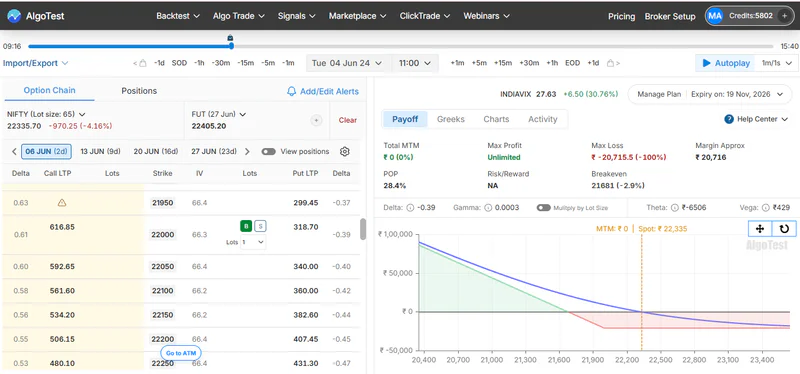
From there, you can move through the day in three ways. AutoPlay advances the replay at the speed you set, manual mode lets you step forward yourself, and you can drag the timeline to any time.
Add the 22,000 put to a position to see its Greeks, IV and P&L update as the session plays out. The simulator guide covers each control in detail.
Want to see how the chain moved on a past expiry or event day? Replay it in the AlgoTest Option Simulator
Can You Download Nifty Option Chain Historical Data?
Yes, but only at end-of-day detail from NSE’s free reports.
NSE’s contract-wise report downloads one contract’s daily data as a CSV file.
NSE’s daily F&O bhavcopy contains every contract traded that day, with open, high, low, close, open interest and traded volume.
NSE’s free reports don’t include minute-by-minute option prices. Intraday history comes from paid data sources or from tools that replay it.
If you want to study or practise on minute-level prices rather than build a dataset, the simulator gets you there faster. To test fixed rules across years of expiries, use backtesting instead.
Build a Tested Strategy From Past Data
Historical data shows what happened; it doesn’t show whether your idea works. Turn what you see into a strategy with a clear context, entry, exit and risk per position. Then evaluate it across historical sessions and live market conditions before real money is involved.
AlgoTest helps you move from an idea to a strategy you can inspect and test before deciding whether to deploy it. You can also check today’s Nifty option chain live.
Join us as we simplify options trading in India.
Related Reading
FAQs
Where can I get Nifty option historical data for free?
NSE publishes it free. Use the Historical Contract-wise Price Volume Data report for one contract over a date range, or the daily F&O bhavcopy for every contract on one day.
Can I see data for an expired Nifty option?
Yes. Choose the expired contract’s expiry date, option type and strike in NSE’s contract-wise report to get its daily prices and open interest. To see it at a specific minute, replay that date in AlgoTest’s option simulator.
Does NSE provide minute-wise option data?
Not in its free reports. NSE’s free contract-wise data and bhavcopy files are end-of-day, with one set of prices per contract per day.
What is option chain historical data?
It’s a record of the full option chain for a past date: every strike’s call and put prices, along with data such as open interest. End-of-day versions show one snapshot per day, while a replay tool shows the chain minute by minute.
Can I backtest strategies with Nifty option historical data?
Yes. AlgoTest runs rule-based backtests on historical Nifty option data, and the free plan includes 100 backtests a month.