The Sensex 85,400 call expiring on 30 October 2025 closed at ₹126 on 28 October. What was it trading at 10:15 am that day? Those two questions refer to the same option, but you need different records to answer them.
For a closing price, use the BSE equity derivatives bhavcopy, the exchange’s end-of-day file. You can open it in Excel and filter by trading date, expiry, strike and option type. For a price at a particular minute, use a historical option chain replay. For contracts trading now, use the live Sensex option chain.
Which date do you need to find an expired Sensex option?
Start with the trading date. It tells you which day’s file to open. The Sensex expiry date tells you which contract to find inside it. If you download the 30 October file to answer a question about 28 October, you’ll find a different session’s prices even if you pick the correct strike.
Here’s the contract we’ll look up in Excel and in replay.
MoneyTicks reports the following prices per unit for the 85,400 call:
If your lookup returns ₹150.80 instead of ₹126, check the trading date first. Both values are closing prices for the same 85,400 call.
How to get historical Sensex option chain data in Excel
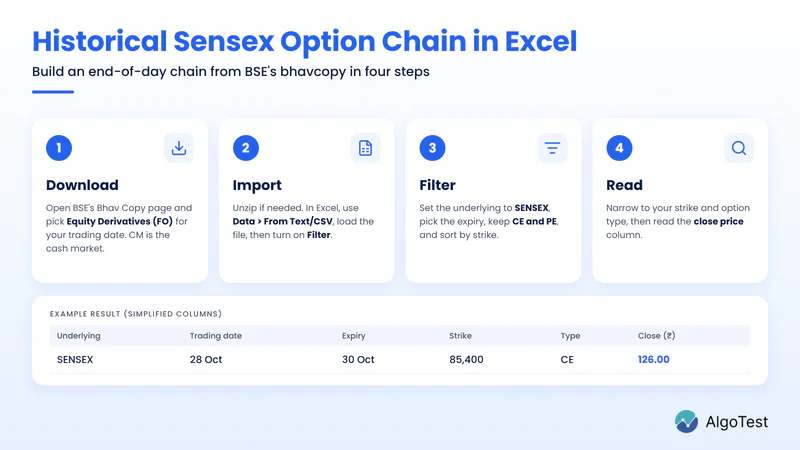
Find the daily derivatives file. Open BSE’s Bhav Copy page. Look for Equity Derivatives (FO) and the trading date 28 October 2025. The cash-market file, labelled CM, covers a different segment.
Import the CSV. Extract the file first if it comes as a ZIP. In Excel, choose Data → From Text/CSV, select the file and check that the dates and prices appear in separate columns. Load the data, then turn on Data → Filter.
Build the chain for one expiry. Filter the underlying to SENSEX, the expiry to 30 October 2025, and the option type to CE and PE. Sort by strike price. You can now compare calls and puts across strikes for that session.
Find the example contract. Narrow the strike to 85400 and the option type to CE. Read the closing price column. If the file also has a last traded price or settlement price, keep those fields separate. Save the filtered view as an Excel workbook if you want to keep the filters.
Want calls and puts side by side? Insert a PivotTable from the original data. In the PivotTable’s own Filters area, select SENSEX, one trading date and one expiry. Put strike price in Rows, option type in Columns (keep CE and PE) and closing price in Values. Check that each strike and option type has just one source row, then use Max to display that single price. Leave missing observations blank. A blank cell and a recorded price of zero mean different things.
How to replay the Sensex option chain at 10:15 am

On 28 October, the 85,400 call traded as high as ₹290 and as low as ₹79.70. The daily file gives you both extremes. It doesn’t tell you which came first or what premium was visible at 10:15 am.
Open the AlgoTest Sensex Option Simulator and set the replay date to 28 October 2025 and the time to 10:15 am IST.
Check that the underlying is SENSEX. Select the 30 October 2025 expiry and find 85,400 in the strike column.
Read the call’s last traded price (LTP) at the selected time. Advance the replay by a minute to see whether the displayed premium changes. LTP is the last recorded trade, so a change of minute needn’t mean a change of price.
Record the replay time beside the premium. That keeps the intraday observation separate from the ₹126 daily close. The Simulator setup guide shows where to change the underlying and expiry.
Frequently asked questions
Can I download an expired Sensex option chain in Excel?
For end-of-day data, use the BSE equity derivatives CSV for the trading date you need. Import it into Excel, select SENSEX and the expiry, and keep all strikes and both option types. For a spreadsheet with one row per minute, you need a source that explicitly offers intraday export.
How do I get the same Sensex option’s prices for several days?
Keep the expiry, strike and option type fixed. Look up that contract across the trading dates you need, or use a contract-level price history. For a chain on one day, do the reverse: keep the trading date and expiry fixed and retain all available strikes.
Why can’t I find the expired contract?
Check the exchange, trading date, expiry and CE/PE filter. Sensex index options trade on BSE. A file dated after expiry won’t give you that contract’s trading prices, and a live chain is for current expiries. For a Nifty contract on NSE, follow the Nifty historical option data guide.