Two platforms leading the option simulator space: StockMock Option Simulator and AlgoTest Option Simulator. Both replay historical markets and support multi-leg strategies. But they are built for different stages of your trading journey.
This guide compares both options trading simulators feature by feature, so you can pick the right option simulator for your workflow.
What Makes a Good Option Simulator?
Not every "simulator" does the same job. A solid one should give you:
Historical market replay – step through a past trading day, candle by candle
Multi-leg strategies – build straddles, spreads, and condors with more than one leg
Historical option chain – real strike prices and premiums from past sessions
Position adjustments – roll, hedge, or exit a leg mid-simulation
Greeks– live Delta, Theta, Gamma, and Vega as the underlying moves
Payoff analysis – a payoff graph showing max profit, max loss, and breakeven
Transition to live trading – how easily a simulated strategy moves into real execution
A virtual Options Trading Simulator that only shows static charts will not prepare you for live markets. You need replay, adjustment, and Greeks together.
With this checklist in mind, here is how StockMock and AlgoTest each measure up.
Related: Best Option Simulator in India
StockMock Option Simulator vs AlgoTest
The core simulation features overlap heavily. Both platforms give you historical replay, multi-leg building, Greeks, and payoff graphs. If your only need is testing a strategy idea on past data, either tool gets the job done.
The difference shows up after the simulation. AlgoTest connects its simulator to Backtesting, Forward Testing, and live algo execution inside one workflow.
StockMock keeps Backtesting and Strategy Builder as separate tools and does not offer live algo execution at all, based on its publicly listed features.
If you plan to stop at practice and manual trading, StockMock's focused approach works fine. If you want to eventually automate the strategy you are testing, that gap matters.
Related: Option Backtesting Guide
AlgoTest Option Simulator
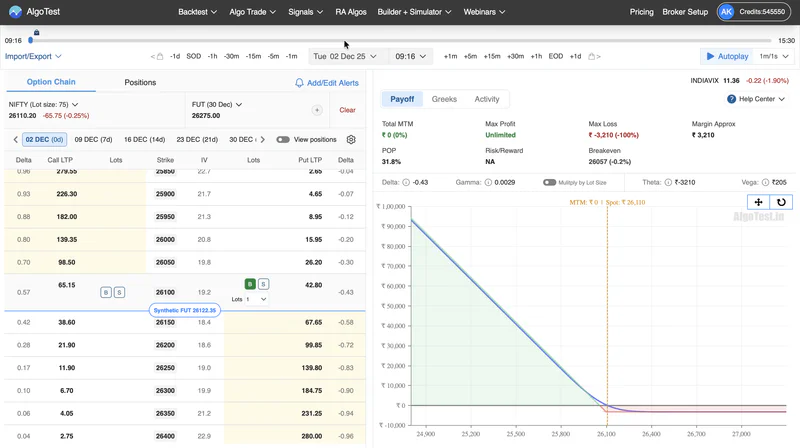
AlgoTest's simulator is built around historical replay. You select a past date and time, and it pulls historical option chain data for that exact moment. You build your position directly on the chain.
Key simulator features:
Historical replay – AutoPlay simulates your position across set time intervals, so you can watch a trade play out minute by minute
Historical option chain – real historical strike and premium data for the date and time you select
Multi-leg strategies – straddles, strangles, spreads, and advanced combinations like calendar spreads and strategies mixing futures with options legs
Position adjustments – view, edit, square off, or delete positions built on the option chain
Greeks – Delta, Theta, Gamma, IV, and Vega for your simulated position
Payoff analysis – a payoff graph plus Max Profit, Max Loss, Risk Reward, and Breakeven
Strategy Builder integration – simulated positions can be imported from or sent to Strategy Builder
Backtesting integration – strategies can be backtested on historical option chain data before simulating or trading them live
Forward Testing – validated strategies can move into paper-trading style forward tests before going live
Scenario analysis – review past data around specific events, like expiry days or election results, to see how a strategy would have reacted
Check out the 10 Best Algo trading Softwares in India (Free & Paid)
Comparison summary: AlgoTest's simulator leans on tick-level historical replay and connects directly to its own Backtesting and Strategy Builder tools, so a strategy moves from idea to test to live trade without leaving the platform.
Related: Option Simulator | Strategy Builder | Backtesting
Looking for the full platform comparison instead of just the simulator? Read AlgoTest vs StockMock: Which One Should You Use.
StockMock Option Simulator
StockMock's Option Simulator lets you practice strategies on historical data before committing real money. As an options trading simulator, it is built for exploring strategies like covered calls, straddles, and spreads through virtual options trading, risk-free, before using them live.
Key simulator features:
Historical replay – simulator data covers historical sessions from January 2021 onwards
Historical option chain – simulations run on real past strike and premium data for Nifty, Bank Nifty, Finnifty, Sensex, and other indices
Multi-leg simulation – combine multiple legs to test structures like iron condors and bull or bear spreads
Replay controls – step through historical price movement to see how a position would have evolved
Manual strategy adjustments – modify legs mid-simulation to test how an adjustment would change the outcome
Payoff analysis – a live payoff graph for each strategy you build
Greeks – shows potential gains, losses, and how Greeks influence your position as you test a strategy
Comparison summary: StockMock keeps its simulator straightforward. It is built for testing and refining strategy ideas on historical data, not for managing a full trade lifecycle inside the same tool.
Which Option Simulator Should You Choose?
Choose StockMock if:
You want a simple, no-frills simulator for practicing strategies
You are testing ideas on Nifty, Bank Nifty, Finnifty, or Sensex history
You do not need live algo execution on the same platform
You prefer separate, lightweight tools for backtesting and simulation
Choose AlgoTest if:
You want simulation, backtesting, and forward testing in one connected workflow
You plan to move from manual testing to algo execution eventually
You trade multi-leg strategies and want adjustments to carry across tools
You want Strategy Builder positions to flow directly into your simulator
Both are valid Option Simulator India choices. Whether you need a simple practice tool or a full option strategy simulator connected to execution, the right pick depends on whether you want a standalone simulator or a platform that takes you from testing to live trading.
Conclusion
StockMock works well if you want a dedicated, easy-to-use Options Trading Simulator for practicing strategies on historical data. AlgoTest works better if you want that same practice connected to backtesting, forward testing, and live execution under one roof.
If you are still deciding, the easiest way to know which fits your workflow is to try it.
Start Using AlgoTest's Option Simulator
Practice your strategies before risking real capital.
Create a free AlgoTest account and explore the Option Simulator, Strategy Builder, Backtesting, and Forward Testing from one platform.