Build trading signals, backtest them, and automate live execution, without coding, TradingView, Chartink, or third-party integrations. Signals AI brings the entire workflow into one platform.
Why Automating Trading Signals Feels Harder Than It Should
Your strategy may be simple.
RSI crosses above 60. SuperTrend turns green. MACD confirms momentum.
The signal is clear.
But things can break in manual execution.
By the time you spot the setup, switch to your broker terminal, and place the trade, the move may already be gone. If you're away from the screen, you might miss the trade entirely.
So you try to automate trading signals. But then the setup gets too complicated.
TradingView alert → Pine Script → webhook → broker integration → execution
Yes, it works.
But it also means dealing with:
a paid TradingView subscription
Pine Script setup
webhook configuration
external integrations
monitoring in case alerts fail
For traders who simply want a no-code way to automate trading signals, that’s far more setup than it should take.
Learn how to create trading signals with AI
A Simpler Way to Build and Automate Trading Signals
AlgoTest Signals AI lets you build indicator-based trading signals, verify them on a real chart, backtest them against actual market data, and deploy them live to your broker. All inside one platform.
No TradingView. No ChartInk. No PineScript. No webhooks. No third-party integrations.
AlgoTest is an algorithmic trading platform built for Indian markets. It supports NIFTY, BANKNIFTY, FINNIFTY, MIDCAPNIFTY, SENSEX, BANKEX, stock options across NIFTY500, futures, and crypto. It connects with 50-plus broker APIs.
How Signals AI Works
Here is how the full workflow runs, using one example.
You want to buy a NIFTY ATM Call when SuperTrend turns green and RSI crosses above 55 on a 15-minute chart. You describe that in plain English to the AI agent. It builds the logic for you.
You open Chart Preview, see exactly when that combination fired historically, and check if the entries look right.
You connect it to an ATM Call Buy strategy, run the backtest, and see the win rate, drawdown, and average return. If the numbers hold up, you deploy it live.
That is the full workflow. Here is what each step does.
Check out 5 Best Indicators for Intraday Trading
Step 1. Describe Your Strategy to the AI Agent
Type your strategy in plain English.
For example: "Enter long when SuperTrend is green and RSI crosses above 55 on a 15-minute NIFTY chart. Exit when SuperTrend turns red."
The AI agent builds the conditions for you automatically. You review and adjust if needed. You do not need to understand the canvas to get started.
Step 2. Or Build It Manually on the Canvas
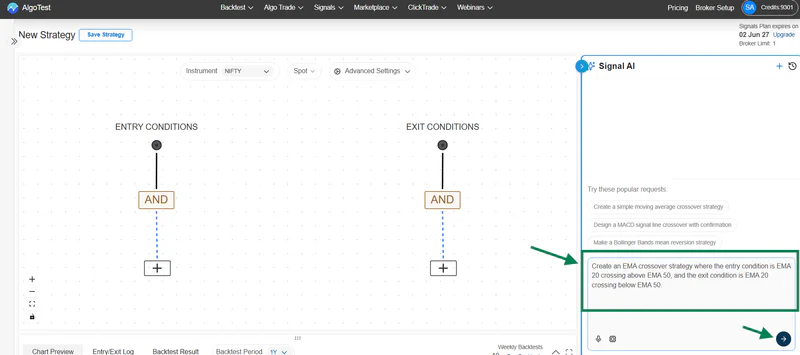
If you want more control, use the visual canvas directly. Each indicator is a block. You connect blocks to define your entry and exit logic, the same way you would write a rule on paper.
You can build trading signals using indicators like:
RSI
MACD
SuperTrend
EMA and SMA
VWAP
Bollinger Bands
ATR
Stochastic
CCI
ADX
You also control the timeframe, candle type, maximum positions open at once, and maximum entries per day.
Step 3. Verify on the Chart
Go to the Chart Preview section. It shows you exactly where your trading signals would have triggered on a real historical chart, with your indicator overlays visible.
If signals are firing at the wrong time or in bad market conditions, adjust your conditions and preview again. You catch the obvious problems here before any money is at risk.
Step 4. Check the Entry and Exit Log

The signal log records every trigger point with a timestamp and the condition that fired it.
A strategy that fires 40 times a day on a 1-minute chart is very different from one that fires twice on a 15-minute chart. You want to know this before you backtest, not after.
Related: Learn how to analyse trading signals on charts
Step 5. Backtest Against Real Market Data
This is where Signals AI is different from most signal tools.
Most platforms tell you when a signal fired. They stop there. Signals AI goes further. You connect an actual execution strategy to your signals and run a full backtest of what would have happened if that trade actually executed.
For example, your signal is EMA 20 crossing above EMA 50 on a 15-minute chart. You connect it to a NIFTY ATM Put Sell with a 50% stop loss and a 10% trailing stop. The backtest simulates every entry and exit, with slippage, taxes, and brokerage included. You can also filter by trading day. Maybe you do not want to trade on zero DTE or specific weekdays. You set that and re-run.
The output gives you win rate, average risk to reward, maximum drawdown, and cumulative P&L. You are not guessing at performance. You are seeing it.
Backtesting is available on the 6-month plan.
Related: How to Backtest Indicator Strategies Before Going Live
Step 6. Deploy Live
Save the strategy and go live. When your indicator conditions fire in real time, AlgoTest executes the trade on your broker account automatically.
No manual order placement. No chart watching. No execution delays.
Read the full Signals AI documentation to understand every feature before you start.
Watch the video for a complete walkthrough.
Build Trading Signals on Option Charts and Combined Premiums
Most signal platforms only work on spot or futures charts. Signals AI lets you generate trading signals on five different data types.
Spot charts. The underlying index or stock price. This is the default.
Futures charts. Signal generation on monthly or next monthly futures data.
Option charts. Generate signals on a rolling option chart itself, not the underlying. For example, plot SuperTrend on a rolling ATM Call chart and take trades based on that.
Synthetic futures. For traders who want exposure without using spot or futures data directly.
Combined premium charts. You combine the premiums of two option legs, for example a rolling ATM Call and a rolling ATM Put, to create a live straddle chart. Indicators are plotted on this combined chart and signals are generated from it. The system handles strike selection, expiry rollover, and ATM recalculation automatically.
No other platform currently lets you backtest trading signals on a combined premium chart.
For options traders running systematic strategies, this is a step up from anything available on TradingView or ChartInk.
If you do not want to build a strategy yourself, Shared Signals is the quicker option.
Subscribe to a pre-built signal based on strategies like SuperTrend or VWAP, created by AlgoTest or other users. Then:
Set your instrument
Define your quantity
Set your stop loss and target
Go live
AlgoTest handles the execution. No alerts, no webhooks, no setup complexity.
Check out the best Paper trading apps for Indicator algo strategies
Who can use Signals AI
Signals AI works well for:
Traders who have an indicator strategy and want to automate it without code
Options traders who want to trigger ATM straddles, strangles, or directional positions based on exact indicator conditions
Traders who cannot watch the market during trading hours
Anyone who wants to validate a strategy with backtesting before risking capital
Related: How to Backtest Rolling Straddles with Indicators
AlgoTest Signals AI vs TradingView vs Manual Trading
The TradingView and webhook path work. But it has an ongoing cost, a PineScript learning curve, and alert maintenance. Signals AI does all of this inside one platform without any of that.
Related: Chartink Alternative for Intraday Trading: Build, Backtest & Execute Signals with AlgoTest
Pricing
Signals AI is part of the AlgoTest Signals plan.
If you want to run signals live or forward test without backtesting first, the 1-month plan covers that. If you want to validate your strategy with a full backtest before going live, you need the 6-month plan.
Start Automating Your Trading Signals
You can try Signals AI for free on AlgoTest. You do not need a TradingView subscription, a developer, or any prior experience with automation.
Describe your strategy, verify it on the chart, run a backtest, and see exactly how it performed before you trade it live.
Join us as we simplify algo trading for retail traders in India.
Trading in derivatives involves significant risk of loss. Backtest results are based on historical data and do not guarantee future performance. AlgoTest is a strategy-building and automation platform and does not provide financial advice.