As a trader, you've probably used TradingView, Tickertape, or both.
Maybe you use Tickertape to find opportunities and TradingView to analyze charts. But when it comes to turning an idea into a backtested and automated strategy, things can get complicated quickly.
You need indicators, alerts, scripts, integrations, and sometimes even coding.
We'll compare TradingView, Tickertape, and Signals AI to see which platform is best suited for creating, testing, and automating trading signals.
What Is TradingView?
TradingView is a charting and technical analysis platform. It is the most widely used charting tool among retail traders globally.
What it does well:
TradingView gives you over 100 built-in indicators, a highly customizable chart interface, and access to data across stocks, indices, forex, crypto, and commodities. You can also use Pine Script to build custom indicators and strategies.
Where it falls short for Indian retail traders:
To build a custom trading signal on TradingView, you need to write Pine Script. That means learning a programming language just to code a basic RSI crossover strategy.
Backtesting on TradingView is powerful but limited by your subscription tier. Free users get up to 5,000 historical bars. Even the premium plans cap out before you can run a meaningful multi-year intraday backtest. For automation, TradingView relies on alerts and webhooks that you must connect to a third-party broker integration yourself.
The full TradingView-to-broker automation path looks like this: Pine Script, alert, webhook, broker API, execution. Each step adds setup time, cost, and a potential point of failure.
Related: How to Build, Backtest & Automate Without Coding or TradingView
What Is Tickertape?
Tickertape is a stock research and screening platform built for Indian investors. It has grown to over 6 million users and focuses on fundamental data and portfolio analysis.
What it does well:
Tickertape gives you a stock screener with over 200 filters across 4,600 Indian stocks, mutual fund research, portfolio tracking, and the Market Mood Index (MMI) for sentiment tracking. It also covers insider and bulk deal data, analyst forecasts, and peer comparisons.
Where it falls short for active traders:
Tickertape is built for investing, not active trading. There is no strategy builder, no backtesting workflow, and no automation. If you want to turn a technical setup into a live trade, Tickertape is not the tool for that.
Related: Master the Option Strategy Builder: AlgoTest Tutorial
What Is Signals AI?
Signals AI is AlgoTest's indicator-based strategy builder. It is designed for traders who want to create, backtest, and automate trading signals without writing code or connecting multiple tools.
The entire workflow, from idea to live execution, happens inside one platform.
How Signals AI Works
Step 1: Describe your strategy in plain English
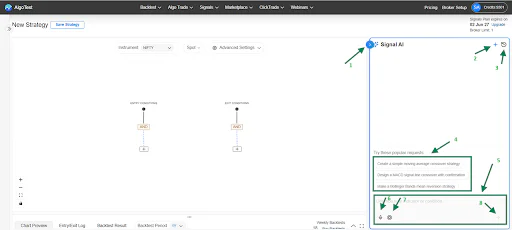
You type your strategy idea in natural language. The Signals AI agent converts it into structured trading logic automatically. For example:
"Buy when RSI crosses above 30 and price is above the 200 EMA. Exit when RSI hits 70 or price falls 2% from entry."
That is a complete, testable signal. No Pine Script. No formulas. No developer needed.
Step 2: Refine on the visual canvas
If you want to adjust the logic manually, you can use the drag-and-drop strategy canvas. You add indicators, set comparison operators, and combine conditions using AND/OR logic blocks. You can also configure time-based exits, set the maximum number of concurrent open trades, and limit daily entries.
Related: How to Create Trading Signals with AI
Step 3: Preview signals on the chart
Before running any backtest, you can see exactly when the strategy would have entered and exited on a historical chart. This helps you spot obvious errors in your logic early.
Step 4: Run a backtest
Connect your strategy conditions to an AlgoTest backtest. Results come back in under 30 seconds. Historical data is built in, so you do not need a separate subscription or manual data import.
Backtest results include win rate, max drawdown, profit factor, year-wise returns, and a cumulative P&L curve compared against the underlying asset.
Step 5: Paper Trade before going live
Run the strategy in live market conditions using paper trades (known as forward testing on the platform). This tests your execution logic, timing, and slippage assumptions without risking real capital.
Check out the best paper trading websites in India
Step 6: Go live with one click
When you are ready, click Algo Trade. The strategy starts executing automatically through your connected broker account. No chart watching. No manual order entry.
Read the Signals AI documentation for a complete step-by-step walkthrough.
What Makes Signals AI Different from TradingView and Tickertape
5 data types for signal generation
Most signal platforms only let you generate signals on spot charts. Signals AI supports five data types:
Spot charts (default): the underlying index or stock price
Futures charts: signal generation on monthly or next monthly futures data
Options charts: signals on a rolling option chart itself, not just the underlying
Synthetic futures: for traders who want exposure without using spot or futures data directly
Generating signals directly on an ATM options chart is something TradingView cannot do natively.
No dependency on TradingView or Chartink
The TradingView webhook path works, but it requires an active TradingView subscription, knowledge of Pine Script, alert maintenance, and a broker integration layer. Signals AI removes all of that. You build, test, and deploy without leaving AlgoTest.
Supported indicators
Signals AI supports RSI, MACD, SuperTrend, EMA, SMA, VWAP, Bollinger Bands, ATR, ADX, Stochastic, CCI, and more. You can combine multiple indicators with logical operators to build layered entry and exit conditions.
Built for Indian markets
Signals AI connects to 50+ Indian brokers. It is designed for Nifty, BankNifty, and F&O traders who want intraday automation without a developer.
Join us now and get priority access
Feature Comparison
Which Trading Platform Is Right for You?
The right platform depends on how you trade.
Choose TradingView if:
You rely heavily on technical analysis and charting
You trade across multiple asset classes such as stocks, forex, crypto, commodities, and indices
You want access to advanced indicators, drawing tools, and custom scripts
You are comfortable using Pine Script to create custom strategies and signals
You don't mind connecting additional tools for automation and execution
TradingView remains one of the most popular charting platforms globally and is widely used by traders who prioritize technical analysis and customization.
Choose Tickertape if:
You primarily invest in Indian stocks and mutual funds
You rely on fundamental analysis and stock screening
You want portfolio tracking, analyst estimates, and market sentiment data
You use screeners to discover investment opportunities
You are not looking to build or automate trading strategies
Tickertape is designed for research and investing, offering stock screeners, mutual fund analysis, portfolio tracking, and market insights for Indian investors.
Choose Signals AI if:
You want to create trading signals without writing code
You want to backtest and forward test strategies before deploying capital
You want to automate indicator-based trading strategies
You prefer a visual strategy builder instead of Pine Script
You want to move from a strategy idea to live execution within a single workflow
Signals AI is designed for traders who want to build, test, and automate rule-based trading signals without having to stitch together multiple platforms.
Bottom line: If your priority is charting, go with TradingView. If it's research and stock discovery, choose Tickertape. If your goal is to create, backtest, and automate trading signals with minimal setup, Signals AI is the better fit.
Simplifying Algo Trading for Retail Traders in India
Algo trading shouldn't require coding, APIs, webhooks, and multiple subscriptions just to automate a simple strategy.
That's what AlgoTest is changing.
With Signals AI, you can describe a strategy in plain English, refine it visually, backtest it, forward test it, and deploy it live all from a single platform. No Pine Script. No complex integrations. No developer required.
Whether you're trading stocks, indices, or options, AlgoTest is built to make algorithmic trading accessible to retail traders.
Ready to build, backtest, and automate your first trading signal?
Sign up with the link below.